
 Honda Accord: Devices that Emit Radio Waves
The following products and systems on your vehicle emit radio waves when in operation.
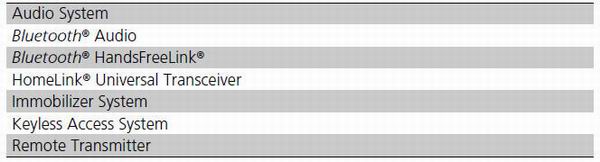
Each of the above complies with the appropriate requirements or the required standards of FCC (Federal Communications Commission) and Industry Canada Standard, described below:
As required by the FCC:
This device complies with Part 15 of the FCC rules. Operation is subject to the following two conditions: (1) This device may not cause harmful interference, and (2) this device must accept any interference received, including interference that may cause undesired operation.
Changes or modifications not expressly approved by the party responsible for compliance could void the user's authority to operate the equipment.
This device complies with Industry Canada Standard RSS-Gen/210/310. Operation is subject to the following two conditions: (1) this device may not cause interference, and (2) this device must accept any interference, including interference that may cause undesired operation of the device.
 Engine Number and TransmissionNumber
See the image below for the locations of your vehicle's engine number and
transmission number.
...
 Reporting Safety Defects
In the U.S.
If you believe that your vehicle has a defect which could cause a crash or
could cause injury or death, you should immediately inform
the National Highway Traffic Safety Administratio ...
See also:
Air Cleaner Removal/Installation
1. Disconnect the MAF sensor/IAT sensor connector (A).
2. Remove the harness clamps (B) and the bolts (C).
3. Loosen the band (D), then remove the air cleaner
housing (E).
4. Install the par ...
Cellular Phonebook
(available on some phones)
On models with navigation system
If you select Cellular Phone from
the Information screen menu, you
will see five HFL options.
For a list of cell phones that are
co ...
General Troubleshooting Information
How to Check for DTCs with the Honda
Diagnostic S f stem (HDS)
When the powertrain control module (PCM) senses an
abnormality in the input or output system, the D
indicator (A) in the gauge contro ...