
 Honda Accord: Compass Calibration
If the compass indicates the wrong direction, or the CAL indicator blinks, you need to manually calibrate the system.
Compass operation can be affected under the following conditions:
• Driving near power lines or stations
• Crossing a bridge
• Passing a large vehicle, or driving near a large
object that can cause a magnetic disturbance
• When accessories such as antennas and roof racks
are mounted by magnets
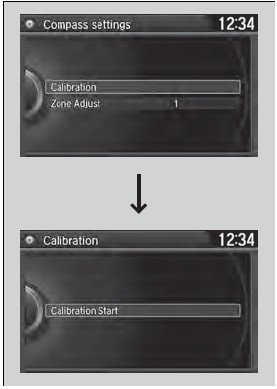
1. Set the power mode to ON.
2. On the top screen of any audio source,
press and hold  for 5 seconds.
- The display switches to the Compass
Settings screen.
3. Rotate  to select Calibration,
then press .
to select Calibration,
then press .
4. When the display changes to Calibration
Start, press .
5. Drive the vehicle slowly in two circles.
- The compass starts to show a direction
after the calibration. The CAL indicator
goes off.
Calibrate the compass in an open area.
While setting the compass, press the BACK button to cancel the setting mode and return to the previous screen.
 Compass*
When you set the power mode to ON, the compass self-calibrates, and the
compass
display appears. ...
 Compass Zone Selection
1. Set the power mode to ON.
2. On the top screen of any audio source,
press and hold for 5
seconds.
- The display switches to the Compass
Settings screen.
3. Rotate to sele ...
See also:
Playing Hard Disc Drive (HDD) Audio
The Hard Disc Drive (HDD) Audio function plays tracks from music CDs that
have
been recorded onto the built-in HDD. You can arrange the tracks in playlists or
play
the tracks using various sea ...
Rear Door Sash Outer Trim
Replacement
4-door
NOTE: Take care not to scratch the door.
1. Remove the door outer molding (see page 20-54).
2. Pull up the door sash outer trim (A) to release the trim
from the clips, and release the t ...
Center Console Armrest Replacement
Special Tools Required
KTC Trim Tool Set SOJATP2014*
* Available through the Honda Tool and
Equipment
Program; call 888-424-6857
NOTE:
- Take care not to scratch the console.
- Use the appro ...