
 Honda Accord: Playing an iPod®
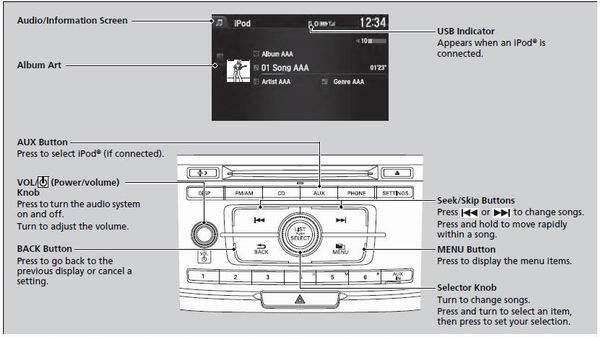
Connect the iPod® using your dock connector to the USB Port, then press the AUX button.
• How to Select a Song from the Music Search List
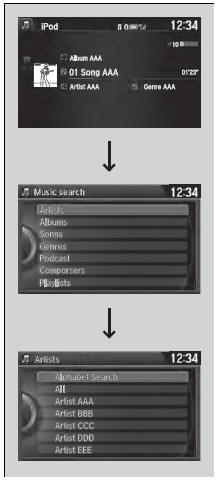
1. Press the MENU button.
2. Rotate  to select Music Search,
then
press
to select Music Search,
then
press  .
.
3. Rotate  to select a menu.
4. Press  to display the items on
that menu.
to display the items on
that menu.
5. Rotate  to select an item, then
press
to select an item, then
press  .
.
Available operating functions vary on models or versions. Some functions may not be available on the vehicle's audio system.
If there is a problem, you may see an error message on the audio/information screen.
• How to Select a Play Mode
You can select repeat and shuffle modes when playing a file.
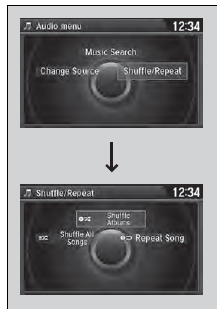
1. Press the MENU button.
2. Rotate  to select
Shuffle/Repeat, then
press
to select
Shuffle/Repeat, then
press  .
.
3. Rotate  to select a mode, then
press
to select a mode, then
press  .
.
• To turn off a play mode
1. Press the MENU button.
2. Rotate  to select the mode you
want to turn off, then press
to select the mode you
want to turn off, then press  .
.
Play Mode Menu Items
Repeat Song: Repeats the current file.
Shuffle Album: Plays all available albums in a selected list (playlists, artists, albums, songs, genres, or composers) in random order.
Shuffle All Songs: Plays all available files in a selected list (playlists, artists, albums, songs, genres, or composers) in random order.

 Playing a CD
Your audio system supports audio CDs, CD-Rs and CD-RWs in either MP3, WMA, or
AAC*1 format. With the CD loaded, press the CD button.
• How to Select a File from the Music Search List
(MP3/WMA ...
 Playing Internet Radio
Connect a compatible phone through Bluetooth®.
You can also connect the phone using your dock connector to the USB port.
Make sure the audio setting is correct for the connection type.
Press t ...
See also:
Warm Up TWC Removal/Installation
1. Raise the vehicle on a lift.
2. Remove the secondary H02S (Sensor 2) (see page
11-197).
3. Remove the bolts (A).
4. Remove the WU-TWC bracket (B).
5. Lower the vehicle.
6. Remove th ...
To Play an iPod
This audio system can operate the
audio files on the iPod with the
same controls used for the in-dash
disc changer. To play an iPod,
connect it to the USB adapter cable
in the console compar ...
Clutch Pedal Position Switch
Replacement
M/T model
1 Disconnect the clutch pedal position switch connector
(A).
2. Loosen the locknut (B), then remove the clutch pedal
position switch (C).
3. Install the clutch pedal position switch ...