
 Honda Accord: Compatible iPod®, iPhone®, and USB Flash Drives
• iPod® and iPhone® Model Compatibility
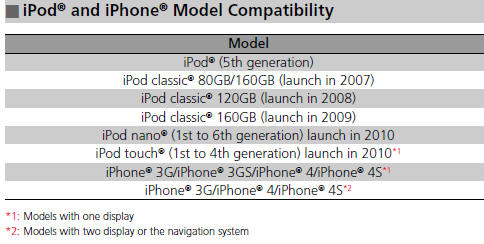
This system may not work with all software versions of these devices.
• USB Flash Drives
• Use a recommended USB flash drive of 256 MB or higher.
• Some digital audio players may not be compatible.
• Some USB flash drives (e.g., a device with security lockout) may not work.
• Some software files may not allow for audio play or text data display.
• Some versions of MP3, WMA, or AAC formats may be unsupported.
Files on the USB flash drive are played in their stored order. This order may be different from the order displayed on your PC or device.
 Recommended CDs
• Use only high-quality CD-R or CD-RW discs labeled for audio use.
• Use only CD-R or CD-RW discs on which the recordings are closed.
• Play only standard round-shaped CDs.
• CDs with M ...
 Customized Features
Use the audio/information screen to customize certain features.
• How to customize
With the ignition switch is in ON
, press the SETTINGS
button. Rotate to
select Audio Settings, Phone Se ...
See also:
Idle Speed Inspection
NOTE:
- Before checking the idle speed, check these items:
- The malfunction indicator lamp (MIL) has not been
reported on, and there are no DTCs.
- Ignition timing
- Spark plug ...
Differential Carrier and Final Driven
Gear Replacement
1. Remove the final driven gear (A) from the differential
carrier (B).
NOTE: Differential carrier bolts have left-hand
threads.
2. Install the final driven gear in the direction shown on
the ...
Mirror Holder Replacement
NOTE:
- Put on gloves to protect your hands.
- When prying with a flat-tip screwdriver, wrap it with
protective tape to prevent damage.
1. Carefully push on the top edge of the mirror holder ( ...