
 Honda Accord: Rear Seats
• Folding Down the Rear Seat
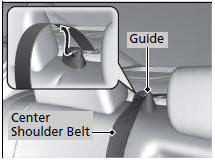
1. Remove the center shoulder belt from the guide.
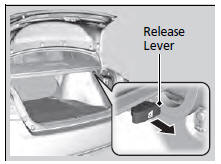
2. Pull the release lever in the trunk to release the lock.
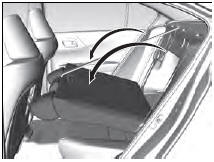
3. Fold the seat-back down.
If the rear head restraints get caught on the front seat-backs, remove the head restraints.
The rear seat-back can be folded down to accommodate bulkier items in the trunk.
Never drive with the seat-back folded down and the trunk lid open.
To lock the seat-back upright, push it backwards until it locks.
When returning a seat-back to its original position, push it firmly back. Also, make sure all rear shoulder belts are positioned in front of the seat-back, and the center shoulder belt is re-positioned in the guide.
Make sure that the folded seat-back does not press against the front passenger seat, as this can cause the weight sensors in the front passenger seat to work improperly.
Also make sure all items in the trunk or items extending through the opening into the rear seat is properly secured. Loose items can fly forward if you have to brake hard.
The front seat(s) must be far enough forward so they do not interfere with the rear seats as they fold down.
 Adjusting the Seat Positions
Adjust the driver's seat as far back as possible
while allowing you to maintain full control of
the vehicle. You should be able to sit upright,
well back in the seat and be able to
adequatel ...
 Armrest
• Using the Rear Seat Armrest
Pull down the armrest in the center seat-back. ...
See also:
How Your Side Airbags Work
If you ever have a moderate to
severe side impact, sensors will
detect rapid acceleration and signal
the control unit to instantly inflate
either the driver’s or the passenger’s
side a ...
DTC Troubleshooting
DTC P062F: Powertrain Control Module (PCM)
Internal Control Module Keep Alive Memory
(KAM) Error
NOTE: Before you troubleshoot record all freeze data
and any on-board snapshot with the HDS, and re ...
Reporting Safety Defects
In the U.S.
If you believe that your vehicle has a defect which could cause a crash or
could cause injury or death, you should immediately inform
the National Highway Traffic Safety Administratio ...