
 Honda Accord: If the Smart Entry Remote Batteryis Weak
If the beeper sounds, the indicator on the ENGINE START/STOP button flashes, and the engine won’t start.

The To Start, Hold Remote Near Start Button message appears on the multiinformation display.

Start the engine as follows.
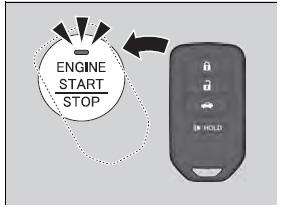
1. Touch the center of the ENGINE START/ STOP button with the H logo on the smart entry remote while the indicator on the ENGINE START/STOP button is flashing.
The buttons on the smart entry remote
should be facing you.
- The indicator flashes for about 30
seconds.
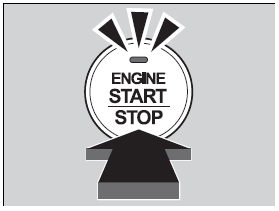
2. Depress the brake pedal (automatic
transmission) or clutch pedal (manual
transmission) and press the ENGINE
START/STOP button within 10 seconds
after the beeper sounds and the indicator
stays on.
- If you don’t depress the pedal, the mode
will change to ACCESSORY.

 Checking the Engine
If the engine does not start, check the starter.
If you must start the vehicle immediately, use an
assisting vehicle to jump start it.
...
 Emergency Engine Stop
If you cannot stop the engine by pressing the ENGINE START/STOP
button, do
either of the following operations:
• Press and hold the ENGINE START/STOP button for about two seconds.
• Firmly ...
See also:
Parts Marking
To deter vehicle theft, certain major components are marked with the vehicle
identification number (VIN). Original parts
have self-adhesive labels. Replacement body parts have generic self-adhesive ...
Front Inner Fender Replacement
NOTE:
- Put on gloves to protect your hands.
- Take care not to scratch the body.
- When prying with a flat-tip screwdriver, wrap it with protective tape to
prevent damage.
1. Remove the f ...
MICU Input Test
NOTE:
• Before testing, troubleshoot the multiplex
integrated control unit first, using B-CAN System Diagnosis Test Mode A
(see page 22-134).
• Before testing, make sure the No. 5 (7. ...