
 Honda Accord: Compass Calibration
If the compass indicates the wrong direction, or the CAL indicator blinks, you need to manually calibrate the system.
Compass operation can be affected under the following conditions:
• Driving near power lines or stations
• Crossing a bridge
• Passing a large vehicle, or driving near a large
object that can cause a magnetic disturbance
• When accessories such as antennas and roof racks
are mounted by magnets
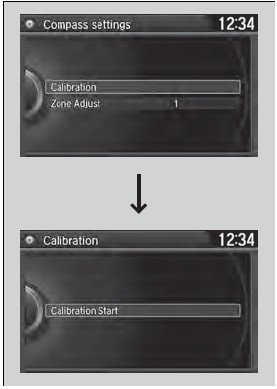
1. Set the power mode to ON.
2. On the top screen of any audio source,
press and hold  for 5 seconds.
- The display switches to the Compass
Settings screen.
3. Rotate  to select Calibration,
then press .
to select Calibration,
then press .
4. When the display changes to Calibration
Start, press .
5. Drive the vehicle slowly in two circles.
- The compass starts to show a direction
after the calibration. The CAL indicator
goes off.
Calibrate the compass in an open area.
While setting the compass, press the BACK button to cancel the setting mode and return to the previous screen.
 Compass*
When you set the power mode to ON, the compass self-calibrates, and the
compass
display appears. ...
 Compass Zone Selection
1. Set the power mode to ON.
2. On the top screen of any audio source,
press and hold for 5
seconds.
- The display switches to the Compass
Settings screen.
3. Rotate to sele ...
See also:
System Description
TPMS Control Unit Inputs and Outputs for 20P Connector
Wire side of female terminals
System Structure
Once the vehicle speed exceeds 28 mph (45 km/h), the TPMS control unit
monitors all four ...
Front Seat Slide Lever Replacement
Driver's seat (manual height adjustable
seat)/passenger's seat
NOTE:
- Put on gloves to protect your hands.
- Take care not to tear or damage the seat covers.
1. Remove the front seat {see pa ...
System Description
EX-L, EX-L PZEV models
The automatic dimming Inside mirror has a front-facing
lux level sensor (A), rear-facing lux level sensors (B), and
a control unit. The control unit receives signals from
ea ...