
 Honda Accord: Your Vehicle at a Glance
Eighth generation (2008–2012) / Honda Accord 2008-2012 Owner's Manual / Your Vehicle at a Glance
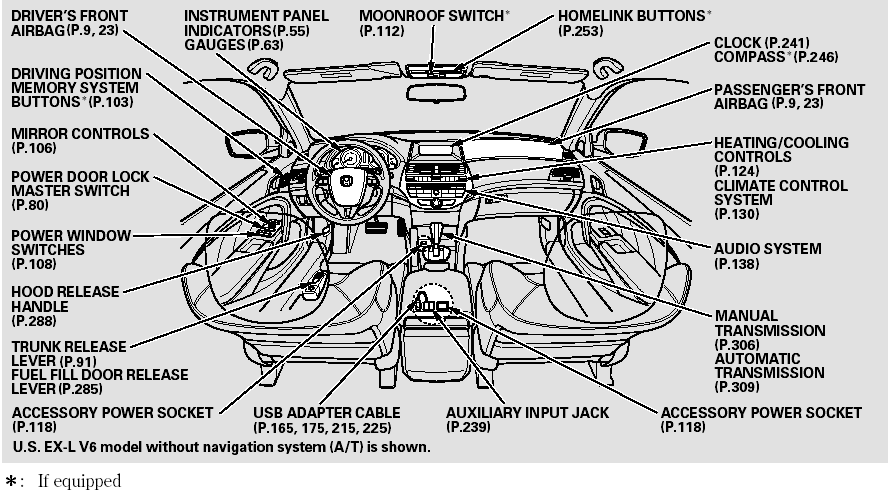
Your Vehicle at a Glance
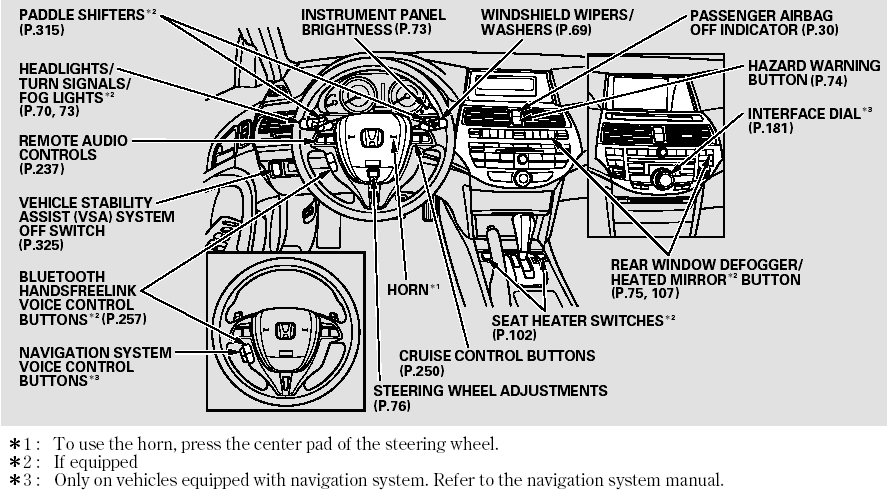
Your Vehicle at a Glance
 Overview of Contents
Contents
A convenient reference to the
sections in this manual.
Your Vehicle at a Glance
A quick reference to the main
controls in your vehicle.
Driver and Passenger Safety
Important informat ...
 Driver and Passenger Safety
This section gives you important
information about how to protect
yourself and your passengers. It
shows you how to use seat belts. It
explains how your airbags work. And
it tells you how to ...
See also:
System Check
1. Connect the HDS to the data link connector.
2. Turn the ignition switch to ON (II).
3. Monitor the SYSTEM CHECK in the IMMOBILIZER INFO with the HDS.
4. If the HDS displays NORMAL N-1,the ...
Tensioner Pulley
Replacement
1. Remove the auto-tensioner (see page 4-31).
2. Clamp the auto-tensioner (A) by using two 8 mm bolts
(B) and a vise (C) as shown. Do not clamp the
auto-tensioner itself, then remove the tensione ...
Immobilizer Key Registration
NOTE:
• The HDS is required for registration of the immobilizer
keys.
• Programming the immobilizer also programs the
keyless transmitter.
• Check for aftermarket electrical eq ...