
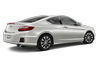
 Honda Accord: XM® Radio Service*
• Subscribing to XM® Radio
1. You need your radio ID ready before registering for subscription. To see
the ID in
the display: Turn the selector knob or the interface dial until 0 appears.
2. Have your radio ID and credit card number ready, and either call or visit the
XM®
website to subscribe.
Contact Information for XM® Radio:
US: XM® Radio at www.siriusxm.com or
1-800-852-9696
Canada: XM® Canada at www.xmradio.ca, or|
1-877-209-0079
• Receiving XM® Radio
Switch to the XM® mode by pressing the SOURCE button repeatedly or operating the audio with touch screen, and stay in this mode for about 30 minutes until the service is activated. Make sure your vehicle is in an open area with good reception.
The XM® satellites are in orbit over the equator; therefore, objects south of the vehicle may cause satellite reception interruptions. Satellite signals are more likely to be blocked by tall buildings and mountains the farther north you travel from the equator.
You may experience reception problems under the following circumstances:
• In a location with an obstruction to the south of
your vehicle.
• In tunnels
• On the lower level of a multi-tiered road
• Large items carried on the roof rack
• XM® Radio Display Messages
Loading:
XM® is loading the audio or program information.
Ch off air:
The channel is not currently broadcasting.
Ch unauthorized:
XM® radio is receiving information update from the network.
No signal:
The signal is too weak in the current location.
Ch unavailable:
No such channel exists, the channel is not part of your subscription, or the artist or title information is unavailable.
Check antenna:
There is a problem with the XM® antenna. Contact a dealer.

 Recommended CDs
• Use only high-quality CD-R or CD-RW discs labeled for audio use.
• Use only CD-R or CD-RW discs on which the recordings are closed.
• Play only standard round-shaped CDs.
• CDs with M ...
See also:
Countershaft Bearing Replacement
Special Tools Required
- Oil Seal Driver, 65 07JAD-PL90100
- Adjustable Bearing Puller, 20-”40 mm 07736-A01000B
- Slide Hammer 3/8"-16 UNF, commercially available
1. Remove the bearing ...
DTC Troubleshooting Index
NOTE: Before you troubleshoot record all freeze data and any on-board
snapshot with the HDS, and review General
Troubleshooting Information (see page 14-4).
NOTE:
*1: The DTC in parentheses is ...
Refueling
1. Park with the driver’s side closest
to the service station pump.
2. To open the fuel fill door, push
down on the lever located to the
left of the driver’s seat.
Gasoline is highly f ...