
 Honda Accord: USB Flash Memory Device Error Messages (Models with navigation system)
Eighth generation (2008–2012) / Honda Accord 2008-2012 Owner's Manual / Features / USB Flash Memory Device Error Messages (Models with navigation system)
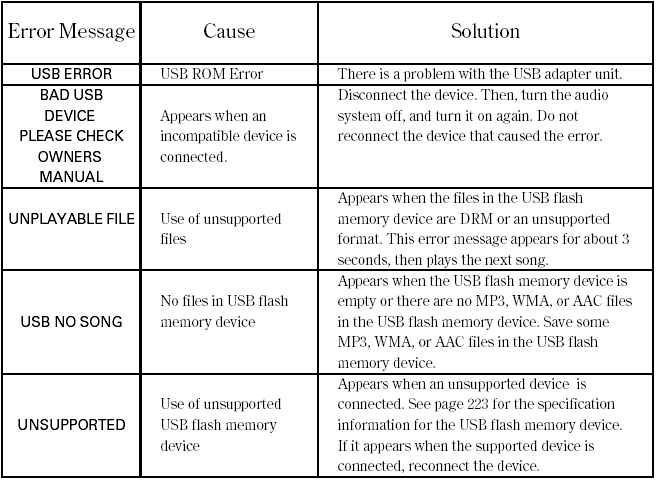
If you see an error message in the center display while playing a USB flash memory device, find the solution in the chart to the right. If you cannot clear the error message, take your vehicle to your dealer.
 To Stop Playing a USB Flash Memory Device
To play the radio, press the FM/AM,
or
button. Press the CD button
to switch to the disc mode. Press the
AUX button to switch back to the
USB.
If you reconnect the same USB flash
memory ...

See also:
Engine Block
...
Oil Check
We recommend that you check the engine oil level every time you refuel.
Park the vehicle on level ground.
Wait approximately three minutes after turning the engine off before you
check
the oil ...
Engine Oil Replacement
1. Warm up the engine.
2 Remove the drain bolt (A), and drain the engine oil.
3. Reinstall the drain bolt with a new washer (B).
4. Refill the engine with the recommended oil (see page
3-2). ...