
 Honda Accord: To Play the FM/AM Radio
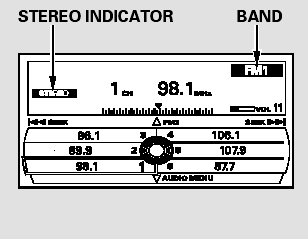
The ignition switch must be in the ACCESSORY (I) or the ON (II) position. Press the AUDIO button to view the audio control display. Turn the system on by pressing the power/volume knob or the FM/AM button. Adjust the volume by turning the power/volume knob.
The band and frequency that the radio was last tuned to are shown on the display. To change bands, press the FM/AM button. You can also change bands by pushing the interface selector up. Each time you push it up, the band will change to FM1, FM2, or AM. On the FM bands, STEREO will be shown on the navigation screen and ST on the center display, if the station is broadcasting in stereo. Stereo reproduction on AM is not available.
On the AM band, AM noise reduction turns on automatically.
 Playing the FM/AM Radio (Models with navigation system)
Playing the FM/AM Radio (Models with navigation system) ...
 To Select a Station
You can use any of five methods to
find radio stations on the selected
band: tune, skip (seek), scan, the
preset buttons, and auto select.
On the FM band, you can also use
the features provid ...
See also:
Component Location Index Rear Door
4-door
...
Rear Door Weatherstrip Replacement
4-door
NOTE;
- Put on gloves to protect your hands.
- Take care not to scratch the door.
- Take care not to damage the front upper
corner clip
(black) and the rear upper corner clips (black ...
Parking Light Bulbs
When replacing, use the following bulbs.
Turn the steering wheel and pull the inner fender back in the same way as
when
replacing the front turn signal/side marker light bulbs.
1. Turn the s ...