
 Honda Accord: Switch Test/Replacement
1. Separate the lumbar support switch cover (A) from the switch (B).
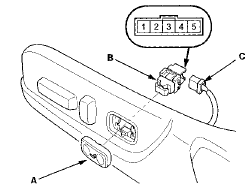
2. Disconnect the 5P connector (C) from the switch.
3. Check for continuity between the terminals in each switch position according to the table.

4. If the continuity is not as specified, replace the switch.
 Circuit Diagram
...
 Motor Test
1. Remove the front seat back panel, and seat-back
cover/pad.
• 4-door (see page 20-221)
• 2-door (see page 20-213)
2. Disconnect the 2P connector (A) from the lumbar
support motor (B ...
See also:
Rear Brake Disc Replacement
NOTE: Keep any grease off the brake disc and the brake
pads.
1. Raise and support the vehicle (see page 1-13).
2. Remove the rear wheel.
3. Release the parking brake lever fully.
4. Loose ...
Clutch Wave-plate Phase Difference
Inspection
1. Place the clutch wave-plate (A) on a surface plate, and
set a dial indicator (B) on the wave-plate.
2. Find the bottom (C) of a phase difference of the
wave-plate, zero the dial indicator an ...
Shift Solenoid Valve Test,
Replacement, and Shift Solenoid
Wire Harness Replacement
1. Connect the HDS to the DLC (A) located under the
driver's side of the dashboard.
2. Turn the ignition switch to ON (II). Make sure the HDS
communicates with the PCM. If it does not go to the
...