
 Honda Accord: Setting the Clock
Clock

You can adjust the time in the clock display with the ignition switch is in
ON 

The clock is automatically updated through the navigation system, so the time does not need to be adjusted.

These indications are used to show how to operate the selector knob.
Rotate  to select.
Press  to enter.
You can customize the clock display to show the 12 hour clock or 24 hour clock.
You can turn the clock display on and off.
• Adjusting the Time
• Using the Settings menu on the audio/information screen
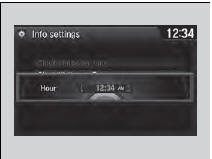

1. Press the SETTINGS button.

1. Press and hold the DISP button.

2. Rotate  to select System
Settings, then
press
to select System
Settings, then
press  .
.
uRepeat the procedure to select Clock, then Clock Adjustment.
3. Rotate  to change hour, then
press
to change hour, then
press  .
.
4. Rotate  to change minute, then
press
to change minute, then
press  .
.

• Using the SETTINGS button
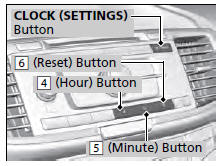
1. Press and hold the CLOCK (SETTINGS)
button until the clock display blinks.
2. Press Preset (4 (Hour) or (5 (Minute) to
adjust the time.
3. Press the CLOCK button again to set the
time.
To set the time to the nearest hour: Press and hold the CLOCK button until the clock display blinks, then press the (6) (Reset) button.
Depending on the displayed time, the clock sets forward or backward.
Example:
1:06 will reset to 1:00 1:53 will reset to 2:00

• Using the audio with touch screen
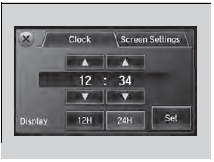
1.Select  .
.
2. Select Clock.
3. Adjust the hours and minutes by selecting
 .
.
4. Select 12H or 24H.
5. Press Set to set the time.
 Controls
This chapter explains how to operate the various controls necessary for
driving. ...

See also:
Crankshaft Installation
Special Tools Required
Driver Handle, 15 x 135L 07749-0010000
Attachment, 24 x 26 mm 07746-0010700
Oil Seal Driver Attachment, 96 mm 07ZAD-PNAA100
1. M/T model: Install the crankshaft end bushing ...
Engine Number
Engine Type
K24Z3: 2.4 L DOHC i-VTEC Sequential Multiport
Fuel-injected, 190HP engine
Serial Number
1000001-: Except PZEV
1500001-: PZEV ...
Recommended Tire Pressures
Normal Driving
The following charts show the
recommended cold tire pressures for
most normal driving conditions.
4-cylinder models
V6 models
The compact spare tire pressure is:
60 psi (42 ...