
 Honda Accord: Refueling
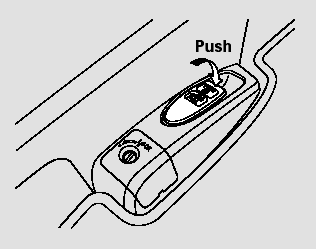
1. Park with the driver’s side closest to the service station pump.
2. To open the fuel fill door, push down on the lever located to the left of the driver’s seat.

Gasoline is highly flammable and explosive. You can be burned or seriously injured when handling fuel.
Stop the engine, and keep heat, sparks, and flame away.
Handle fuel only outdoors.
Wipe up spills immediately.
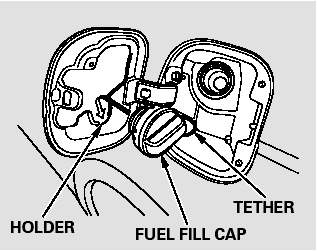
3. Remove the fuel fill cap slowly.
You may hear a hissing sound as pressure inside the tank equalizes.
The fuel fill cap is attached to the fuel filler with a tether. Place the cap in the holder on the fuel fill door.
4. Stop filling the tank after the fuel nozzle automatically clicks off. Do not try to ‘‘top off’’ the tank. This leaves some room in the fuel tank for the fuel to expand with temperature changes.
If the fuel nozzle keeps clicking off even though the tank is not full, there may be a problem with your vehicle’s fuel vapor recovery system. The system helps keep fuel vapor from going into the atmosphere. Try filling at another pump. If this does not fix the problem, consult your dealer.
5. Screw the fuel fill cap back on until it clicks at least once. If you do not properly tighten the cap, you will see a ‘‘CHECK FUEL CAP’’ message on the information display. If the system still detects an evaporative system leak after retightening the cap, the malfunction indicator lamp may come on.
6. Push the fuel fill door closed until it latches.
 Fuel Recommendation
Your vehicle is designed to operate
on unleaded gasoline with a pump
octane number of 87 or higher. Use
of a lower octane gasoline can cause
a persistent, heavy metallic rapping
noise that c ...
 Check Fuel Cap Message
Your vehicle’s onboard diagnostic
system will detect a loose or missing
fuel fill cap as an evaporative system
leak. The first time a leak is detected
a ‘‘CHECK FUEL CAP’’ message ...
See also:
If a Child Requires Close Attention
Many parents say they prefer to put
an infant or a small child in the front
passenger seat so they can watch the
child, or because the child requires
attention.
Placing a child in the front s ...
Countershaft Bearing Replacement
Special Tools Required
- Oil Seal Driver, 65 07JAD-PL90100
- Adjustable Bearing Puller, 20-”40 mm 07736-A01000B
- Slide Hammer 3/8"-16 UNF, commercially available
1. Remove the bearing ...
In-car Temperature Sensor
Replacement
1. Remove the driver's inner dashboard trim (see page
20-167).
2. Disconnect the connector (A), and remove the in-car
temperature sensor (B) from the air hose (C).
3. Install the sensor in the ...