
 Honda Accord: Recommended CDs
• Use only high-quality CD-R or CD-RW discs labeled for audio use.
• Use only CD-R or CD-RW discs on which the recordings are closed.
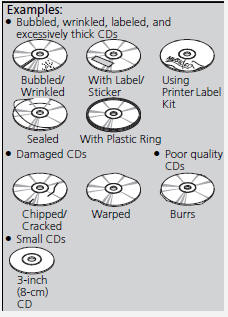
• Play only standard round-shaped CDs.
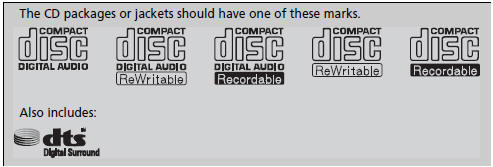
• CDs with MP3, WMA, or AAC files
• Some software files may not allow for audio play or text data display.
• Some versions of MP3, WMA, or AAC formats may be unsupported.
iA Dual-disc cannot play on this audio unit. If recorded under certain conditions, a CD-R or CD-RW may not play either.
Manufactured under license under U.S. Patent Nos: 5,956,674; 5,974,380; 6,487,535 & other U.S. and worldwide patents issued & pending. DTS, the Symbol, & DTS and the Symbol together are registered trademarks & DTS 2.0 Channel is a trademark of DTS, Inc. Product includes software.
©DTS, Inc. All Rights Reserved.
• Protecting CDs
Follow these precautions when handling or storing CDs:
• Store a CD in its case when it is not being played.
• When wiping a CD, use a soft clean cloth from the center to the outside
edge.
• Handle a CD by its edge. Never touch either surface.
• Never insert foreign objects into the CD player.
• Keep CDs out of direct sunlight and extreme heat.
• Do not place stabilizer rings or labels on the CD.
• Avoid fingerprints, liquids, and felt-tip pens on the CD.
NOTICE
Do not insert a damaged CD. It may be stuck inside and damage the audio unit.
 XM® Radio Service*
• Subscribing to XM® Radio
1. You need your radio ID ready before registering for subscription. To see
the ID in
the display: Turn the selector knob or the interface dial until 0 appears.
2. ...
 Compatible iPod®, iPhone®, and USB Flash Drives
• iPod® and iPhone® Model Compatibility
This system may not work with all software versions
of these devices.
• USB Flash Drives
• Use a recommended USB flash drive of 256 MB or higher. ...
See also:
Symptom Troubleshooting
Hard Steering
NOTE:
-Compare to a known-good vehicle that is the same
trim level.
-Check for suspension damage.
m Check the steering alignment.
-Check the tire condition and pressure.
1 ...
Ignition Switch Replacement
NOTE: SRS components are located In the area. Review
the SRS component locations 4-door (see page 24-21),
2-door (see page 24-23), and precautions and
procedures (see page 24-25) before doing repai ...
Glass Replacement
1. Close the glass fully.
2. Slide the sunshade all the way back.
3. Pry out the lid (A), remove the screw (B), and release
the hooks (C), then remove the bracket cover (D).
Repeat on the op ...