
 Honda Accord: Rear Seat Cushion Cover
Replacement
Honda Accord: Rear Seat Cushion Cover
Replacement
NOTE: -Put on gloves to protect your hands.
- Take care not to tear or damage the seat covers.
1. Remove the seat cushion (see page 20-241).
2. From the back of the seat-back, release all the upholstery rings (A), and fold back the seat cushion cover (B).
2-door
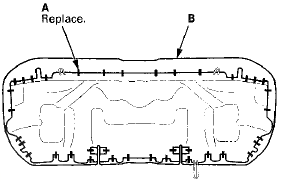
4-door

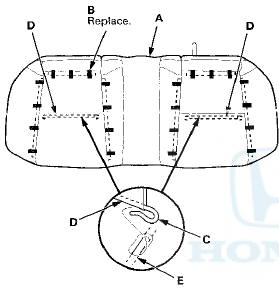
3. Pull back the edge of the seat cushion cover (A) all the way around, and release the upholstery rings (B), and release the hooks (C) of the lateral wires (D) from the longitudinal wires (E) on the pad, then remove the seat cushion cover.
NOTE: The leather seat cushion cover is shown; the other types of the seat cushion cover are similar.
2-door
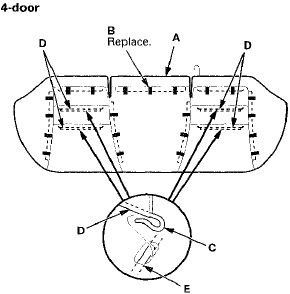
4. Install the cushion cover in the reverse order of removal, and note these items: - To prevent wrinkles when installing the seat cushion cover, make sure the material is stretched evenly over the pad before securing the upholstery rings.
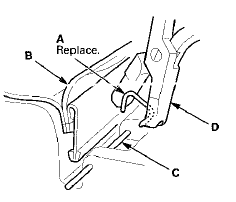
- Replace all of the upholstery rings (A) fastening the seat cushion cover (B) to the pad wires (C) with new ones using commercially available upholstery ring pliers (D).
 Rear Seat Side Bolster Cover
Replacement
Rear Seat Side Bolster Cover
Replacement
4-door
NOTE: Take care not to tear or damage the seat covers.
1. Remove the seat side bolster (see page 20-242).
2. Release all the hook strips (A), fold back the seat side
bolster cover (B), ...
 Bumpers
...
See also:
Console Accessory Power Socket
Test/Replacement
NOTE: If all of the front and console accessory power
sockets do not work, check the No. 1 8 (7.5 A) fuse in the
driver's under-dash fuse/relay box and ground (G503)
first.
1. Remove the center ...
Intermediate Shaft Disassembly
Special Tools Required
•Half Shaft Base 07NAF-SR30101
-Oil Seal Driver, 44.5 mm 07947-SB00100
1. Remove the heat shield (A).
3. Press the intermediate shaft (A) out of the
intermediate s ...
Trunk Lower Trim Replacement
4-door
NOTE:
- Put on gloves to protect your hands.
- Take care not to scratch the trunk lid.
1. Remove the license plate from the trunk lid.
2. Remove the clips fastening the trunk lower t ...