
 Honda Accord: Pump Replacement
1. Place a suitable container under the vehicle to catch any spilled fluid.
2. Drain the power steering fluid from the reservoir (see page 17-28).
3. Remove the drive belt (A) from the pump pulley (see page 4-30).
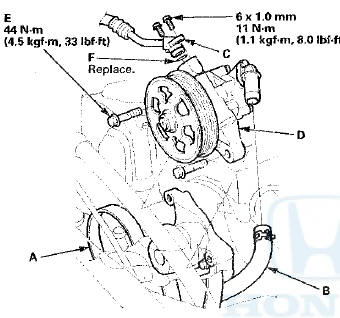
4. Cover the auto-tensioner, the alternator, and the A/C compressor with several shop towels to protect them from spilled power steering fluid. Disconnect the pump inlet hose (B) and the pump outlet hose (C) from the pump (D), and plug them. Take care not to spill the fluid on the vehicle. Wipe off any spilled fluid at once. Do not turn t h e steering wheel with the pump removed.
5. Remove the pump mounting bolts (E), then remove the pump.
6. Cover the opening of the pump with a piece of tape to prevent foreign material from entering the pump.
7. Transfer the pump inlet hose and the pump outlet hose from the original pump onto the new pump with a new O-ring (F).
8. Loosely install the pump in the pump bracket with the mounting bolts, then tighten the pump fittings to the specified torque.
9. Tighten the pump mounting bolts to the specified torque.
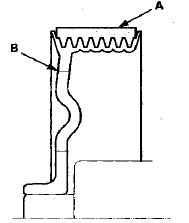
10. Install the drive belt (A) (see page 4-30).
Note these items during drive belt installation: -Inspect the belt for wear and cracks. Replace the belt if necessary.
-Make sure that the belt is properly positioned on the pulleys (B).
-Do not get power steering fluid or grease on the auto-tensioner, the alternator, the A/C compressor, and the drive belt, or the pulley faces. Clean off any fluid or grease before installation.
11. Fill the reservoir to the upper level line (see page 17-28).
12. Start the engine, and check for leaks.
 Power Steering Hose, Line, and Pressure Switch
Replacement
Power Steering Hose, Line, and Pressure Switch
Replacement
Note these items during installation:
-Connect each hose to the corresponding line securely until it contacts the
stop on the line. Install the clamp or
adjustable clamp at the specified distance ...
 Pump Overhaul
Exploded View
Replace the pump as an assembly if any of the parts indicated with an
asterisk (*) are worn or damaged.
Special Tools Required
-Attachment, 32 x 35 mm 07746-0010100
-Driver Handl ...
See also:
Steering Gearbox Removal
Special Tools Required
-Engine Hanger Adapter VSB02C000015*
•Engine Support Hanger, A and Reds
AAR-T1256*
-Ball Joint Remover, 28 mm 07MAC-SL0A202
-Ball Joint Thread Protector, 12 mm
07AA ...
Defaulting All the Settings
Reset all the menu and customized settings as the factory defaults.
1. Press the SETTINGS button.
1. Press and hold the DISP button.
2. Rotate to select System
Settings, then
press .
...
Disc Changer Error Messages (Models with navigation system)
The chart on the right explains the
error messages you may see in the
center display while playing a disc.
If you see an error message in the
center display while playing a disc,
press the ej ...