
 Honda Accord: Power Mirror Replacement
NOTE: Take care not to scratch the door.
1. Lower the door glass fully.
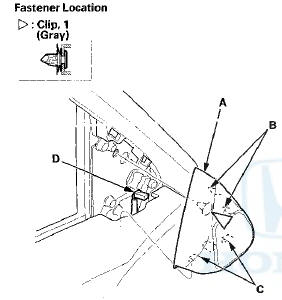
2. With your hand, carefully pull out the top edge of the tweeter cover (A) to release the upper hooks (B) and detach the clip. Remove the cover by lifting it upward to release the bottom hooks (C). Disconnect the tweeter connector (D).
3. Disconnect the power mirror connector (A).
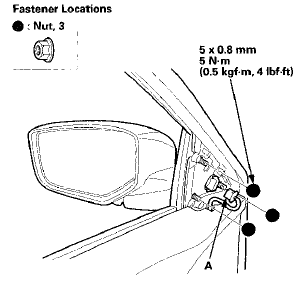
4. While holding the power mirror, remove the nuts securing the mirror.
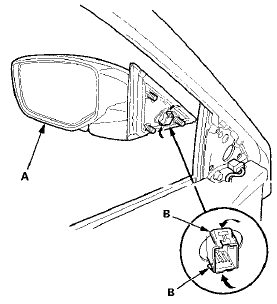
5. While holding the power mirror (A), squeeze the retaining tabs on the connector clip (B), then push out to remove the power mirror.
6. Install the mirror in the reverse order of removal, and note these items: - Make sure the connectors are plugged in properly.
- If the clip is damaged or stress-whitened, replace it with a new one.
- Push the clip and the hooks on the cover into place securely.

 Mirror Holder Replacement
NOTE:
- Put on gloves to protect your hands.
- When prying with a flat-tip screwdriver, wrap it with
protective tape to prevent damage.
1. Carefully push on the top edge of the mirror holder ( ...
See also:
Component Location Index
4-door
4-door
2-door
2-door
...
Master Cylinder Inspection
1. Remove the master cylinder (see page 19-26).
2. Inspect and note these items:
- Before reassembling, check that all parts are free of
dirt and other foreign particles.
- Do not try to disas ...
A/C Condenser Replacemen
1. Recover the refrigerant with a recovery/recycling
charging station (see page 21-80).
2. Remove the front grille cover (see page 20-274).
3. Remove the intake air duct and the water separator ...