
 Honda Accord: Playing the FM/AM Radio (Models without navigation system)
Eighth generation (2008–2012) / Honda Accord 2008-2012 Owner's Manual / Features / Audio System / Playing the FM/AM Radio (Models without navigation system)
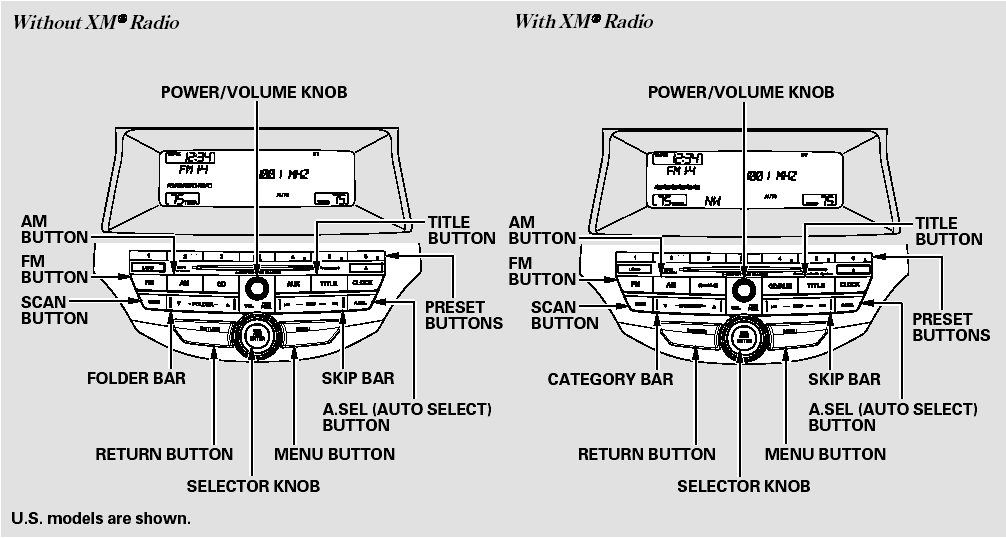
Playing the FM/AM Radio (Models without navigation system)
 Menu Display
To select any setting such as the
clock, sound adjusting, or the
compass (if equipped), press the
MENU button. To use any audio
system function, the ignition switch
must be in the ACCESSORY ...
 To Play the Radio
The band and frequency that the
radio was last tuned to are displayed.
To change bands, press the AM or
FM button. On the FM band, ST will
be displayed if the station is
broadcasting in stere ...
See also:
How to Refuel
1. Stop your vehicle with the service station
pump on the left side of the vehicle in the
rear.
2. Turn off the engine.
3. Push on the fuel fill door release handle at
the foot of the driv ...
SRS Unit Update
Special Tools Required
• Honda Diagnostic System (HDS) tablet tester
• Honda Interface Module (HIM) and an iN workstation
with the latest HDS software version
• HDS pocket tester
Ð ...
If the Charging System IndicatorComes On
• Reasons for the indicator to come on
Comes on when the battery is not being charged.
• What to do when the indicator comes on
Turn off the heating and cooling system* /climate control syste ...