
 Honda Accord: Playing Internet Radio
Connect a compatible phone through Bluetooth®.

You can also connect the phone using your dock connector to the USB port.
Make sure the audio setting is correct for the connection type.
Press the AUX button to select Pandora mode.
Pandora®, the Pandora logo, and the Pandora trade dress are trademarks or registered trademarks of Pandora Media, Inc., used with permission. Pandora is currently available exclusively in the United States.
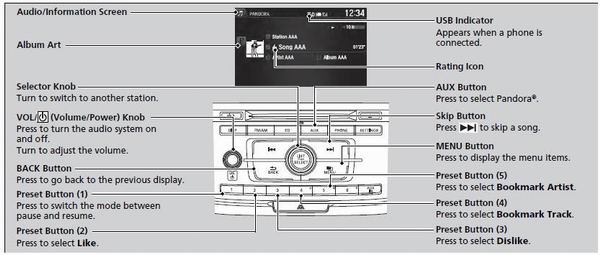
To find out if your phone is compatible with this feature, visit www.handsfreelink.honda.com, or call (888) 528-7876.
Pandora® is a personalized Internet radio service that selects music based on an artist, song, or genre a user enters, and streams what is likely to be of interest.
To use this service in your vehicle, the Pandora® app must first be installed on your phone. Visit www.pandora.com. for more information.
If you cannot operate Pandora® through the audio system, it may be streaming through Bluetooth® Audio. Make sure Pandora® mode on your audio system is selected.
• Pandora® Menu
You can operate some of the Pandora® menu items from your vehicle’s audio system. The available items are:
• Like
• Dislike
• Station List
• Change Source
• Bookmark Track
• Bookmark Artist
• Play/Pause
• Operating a menu item
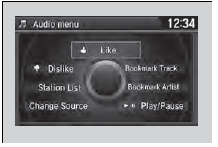
1. Press the MENU button.
2. Rotate  to select an item, then
press
to select an item, then
press  .
.
Available operating functions vary on software versions. Some functions may not be available on the vehicle's audio system.
If there is a problem, you may see an error message on the audio/information screen.
There are restrictions on the number of songs you can skip or dislike in a given hour.
 Playing an iPod®
Connect the iPod® using your dock connector to the USB Port, then press the
AUX
button.
• How to Select a Song from the Music Search List
1. Press the MENU button.
2. Rotate to select ...
 Playing a USB Flash Drive
Your audio system reads and plays sound files on a USB flash drive in either
MP3,
WMA or AAC*1 format.
Connect your USB flash drive to the USB port, then press the AUX
button.
• How to Selec ...
See also:
System Description
EX-L, EX-L PZEV models
The automatic dimming Inside mirror has a front-facing
lux level sensor (A), rear-facing lux level sensors (B), and
a control unit. The control unit receives signals from
ea ...
Low Oil Pressure Indicator Circuit Troubleshooting (Open)
1 Connect the Honda Diagnostic System (HDS) to the
data Jink connector (DIG) (see step 2 on page 11-3).
2. Turn the ignition switch to ON (ll).
3. Make sure the HDS communicates with the vehicl ...
Audio System Lighting
You can use the instrument panel
brightness control knob to adjust the
illumination of the audio system. The audio system
illuminates when the parking lights
are on, even if the radio is turne ...