
 Honda Accord: Playing a CD
Your audio system supports audio CDs, CD-Rs and CD-RWs in either MP3, WMA, or AAC*1 format. With the CD loaded, select the CD mode.
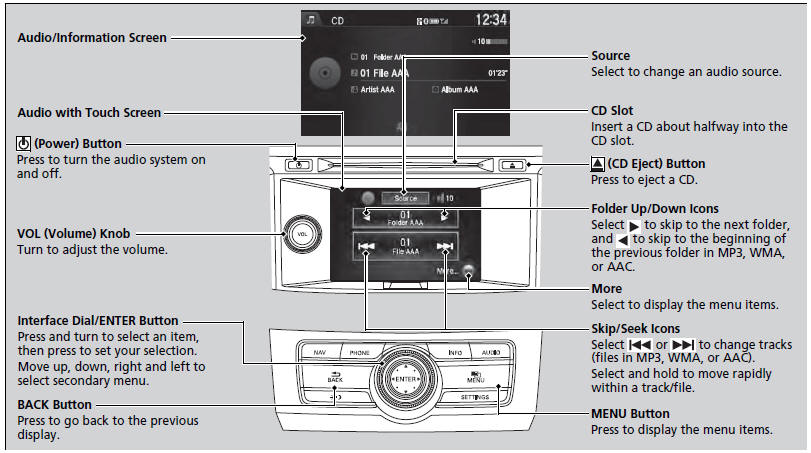
• How to Select a File from the Music Search List (MP3/WMA/AAC)
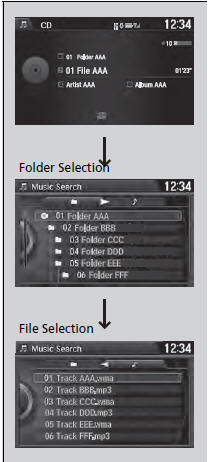
1. Press the MENU button.
2. Rotate  to select Music
Search, then
press
to select Music
Search, then
press  .
.
3. Rotate  , move
 , then press
 to
select a file from the Music Search list.
to
select a file from the Music Search list.
NOTICE
Do not use CDs with adhesive labels. The label can cause the CD to jam in the unit.
WMA files protected by digital rights management (DRM) cannot be played.
The audio system displays Unplayable File, then skips to the next file.
Text data appears on the display under the following circumstances:
• When you select a new folder, file, or track.
• When you change the audio mode to CD.
• When you insert a CD.
If you eject the CD but do not remove it from the slot, the system reloads the CD automatically after several seconds.
You can control a CD audio using voice commands.
• How to Select a Play Mode
You can select scan, repeat, and random modes when playing a track or file.
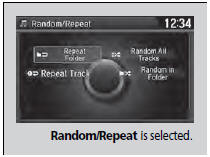

1. Press the MENU button.
2. Rotate  to select Scan or
Random/
Repeat, then press
to select Scan or
Random/
Repeat, then press  .
.
3. Rotate  to select a mode, then
press
to select a mode, then
press  .
.
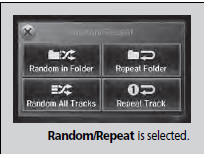

1. Select More.
2. Select Scan or Random/Repeat.
3. Select a mode.
• To turn off a play mode

1. Press the MENU button.
2. Rotate  to select the mode you
want to turn off, then press
to select the mode you
want to turn off, then press  .
.

1. Select More.
2. Select the mode you want to turn off.
Play Mode Menu Items
Scan
Scan Folders (MP3/WMA/AAC): Provides 10-second sampling of the first file in each of the main folders.
Scan Tracks: Provides 10-second sampling of all tracks on the CD (all files in the current folder in MP3, WMA, or AAC).
Random/Repeat
Repeat Folder (MP3/WMA/AAC): Repeats all files in the current folder.
Repeat Track: Repeats the current track/file.
Random in Folder (MP3/WMA/AAC): Plays all files in the current folder in random order.
Random All Tracks: Plays all tracks/files in random order.
 Playing XM® Radio
• To Play the XM® Radio
1. Select the XM® mode.
2. Press the MENU button.
3. Rotate to select XM Tune
Mode, then press .
4. Rotate to select Channel
Mode or Category Mode, then p ...
 Playing Hard Disc Drive (HDD) Audio
The Hard Disc Drive (HDD) Audio function plays tracks from music CDs that
have
been recorded onto the built-in HDD. You can arrange the tracks in playlists or
play
the tracks using various sea ...
See also:
Rear Air Outlet Replacement
NOTE: Take care not to scratch the body.
1_ Remove the rear bumper (see page 20-260).
2. Release the hooks (A), then remove the rear air outlet
(B).
3. Install the air outlet by pushing on t ...
Inboard Joint Side
1. Wrap the splines with on the driveshaft vinyl tape (A)
to prevent damaging the inboard boot.
2. Install the inboard boot onto the driveshaft, then
remove the vinyl tape. Be careful not to dama ...
Oil Filter Feed Pipe Replacement
1. Remove the oil filter base (see page 8-13).
2. Remove the oil filter feed pipe.
3. Install the two 20 x 1.5 mm nuts (A) onto the new oil
filter feed pipe. Hold one nut with a wrench, then us ...