
 Honda Accord: Motor Test
1. Remove the front seat back panel, and seat-back cover/pad.
• 4-door (see page 20-221) • 2-door (see page 20-213) 2. Disconnect the 2P connector (A) from the lumbar support motor (B).
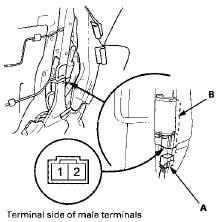
3. Test the motor by applying battery power and body ground to the terminals.
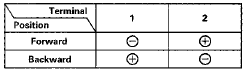
4. If the motor does not run or fails to run smoothly, replace it.
• 4-door (see page 20-202) • 2-door (see page 20-201)
 Switch Test/Replacement
1. Separate the lumbar support switch cover (A) from
the switch (B).
2. Disconnect the 5P connector (C) from the switch.
3. Check for continuity between the terminals in each
switch position a ...
 Seat Heaters
...
See also:
Tire Labeling
The tires that came on your vehicle have a
number of markings. Those you should be
aware of are described below.
• Tire Sizes
Whenever tires are replaced, they should be replaced with tires ...
Brake System Indicator
The brake system
indicator normally
comes on when
you turn the ignition switch to the
ON (II) position and as a reminder to
check the parking brake. It will stay
on if you do not fully r ...
Ignition Timing Inspection
1. Connect the Honda Diagnostic System (HDS) to the
data link connector (DLC) (see step 2 on page 11-3).
2. Turn the ignition switch to ON (II).
3. Make sure the HDS communicates with the vehic ...