
 Honda Accord: Mirrors
Keep the inside and outside mirrors clean and adjusted for best visibility.
Be sure to adjust the mirrors before you start driving.
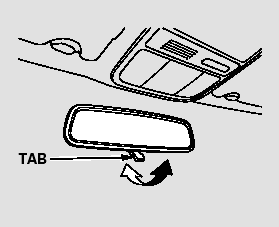
The inside mirror has day and night positions. The night position reduces glare from headlights behind you.
Flip the tab on the bottom edge of the mirror to select the day or night position.
 Selecting a Memorized Position
To select a memorized position, do
this:
1. Make sure the parking brake is set
and the shift lever is in Park
(automatic).
2. Press the desired memory button
(1 or 2) until you hear a beep ...
 Adjusting the Power Mirrors
1. Turn the ignition switch to the ON
(II) position.
2. Move the selector switch to L
(driver’s side) or R (passenger’s
side).
3. Push the appropriate edge of the
adjustment switch to ...
See also:
Washer Motor Test
1. Remove the right inner fender (see page 20-290).
2. Disconnect the 2P connector (A) from the windshield
washer motor (B).
USA models
3. Test the motor by connecting battery power to
term ...
Automatic Transmission and A/T Differential: (cont'd)
...
Console Compartment
To open the console compartment,
pull up on the lever and lift the
armrest.
To close, lower the armrest, and
push it down until it latches. ...