
 Honda Accord: Memorizing the Tire Pressure Sensor ID
Special Tools Required
TPMS Trigger Tool ATEQ VT55*
- Available through the Honda Tool and Equipment Program 888-424-6857
All four tire pressure sensor IDs must be memorized to the TPMS control unit whenever you do any of these actions: - Replace the TPMS control unit - Replace the tire pressure sensor.
- Substitute a known-good wheel with tire pressure sensor.
NOTE: - The TPMS tool is necessary to do this procedure.
- Let the vehicle sit for at least 5 minutes to allow the tire pressure sensors to switch to sleep mode.
- To ensure the TPMS control unit memorizes the correct ID, the vehicle with the new tire pressure sensor must be at least 10ft (3 m) away from other vehicles that have tire pressure sensors.
- When doing a tire rotation, memorizing the sensors in not needed.
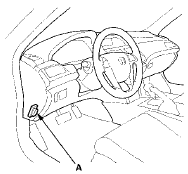
1. With the ignition switch in LOCK (0), connect the HDS to the data link connector (DLC) (A) located under the driver's side of the dashboard.
2. Turn the ignition switch to ON (II).
3. Make sure the HDS communicates with the vehicle and the TPMS control unit. If it does not, troubleshoot the DLC circuit (see page 11-181).
4. Select Sensor ID Learning from the Mode Menu on the HDS.
5. Follow HDS screen prompts to turn on the TPMS tool.
. Hold the TPMS tool near the valve stem of one wheel, and memorize the tire pressure sensor ID by following the screen prompts on the HDS.
NOTE: - See the HDS Help menu for specific instructions.
- If you turn the ignition switch to LOCK (0) before memorizing all four sensor IDs, the memorizing ID is canceled.
- If more than one sensor ID is displayed on the HDS, verify that the vehicle has not been driven for 5 minutes, and there are no other vehicles or tire pressure sensors within 10 ft (3 m).
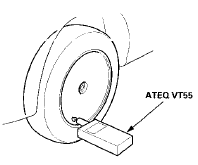
7. Repeat step 6 for each wheel until all four sensor IDs are memorized. When all four IDs are memorized, the low tire pressure indicator blinks.
8. Turn the ignition switch to LOCK (0).
9. Disconnect the HDS from the DLC.
10. Test-drive the vehicle at 28 mph (45 km/h) or more for at least 1 minute.
11. Make sure the low tire pressure indicator does not blink.
12. Make sure the tires are inflated to the specified tire pressure listed on the doorjamb sticker.
13. Turn the ignition switch to LOCK (0).
 General Troubleshooting Information
System Indicator
The TPMS (tire pressure monitoring system) has the low
tire pressure indicator and the TPMS indicator.
The Low Tire Pressure Indicator
- If the system detects low pressure in an ...
 Tire Pressure Sensor Location
Special Tools Required
TPMS Trigger Tool ATEQ VT55*
*Available through the Honda Tool and
Equipment
Program 888-424-6857
NOTE:
- The TPMS tool is necessary to do this procedure.
- Let the ve ...
See also:
Clutch Pedal Position Switch
Test
M/T model
1. Disconnect the clutch pedal position switch 3P
connector (A).
2. Remove the clutch pedal position switch (B).
3. Check for continuity between the terminals according
to the table ...
Front Passenger's Airbag Replacement
NOTE: If r e p l a c i n g t h e f r o n t passenger's airbag after
d e p l o y m e n t , refer t o Component Replacement/
Inspection A f t e r Deployment (see page 24-208) f o r a
c o m p l e t e ...
Rear Bumper Removal/Installation
NOTE:
- Have an assistant help you when removing and
installing the rear bumper.
- Take care not to scratch the rear bumper or the body.
- Put on gloves to protect your hands.
- When prying ...