
 Honda Accord: Making a Call
You can make calls using any phone number or a name in the HFL phonebook. You can also redial the last number called.
Bluetooth is the wireless technology that links your phone to HFL. HFL uses a Class 2 Bluetooth, which means the maximum range between your phone and vehicle is 30 feet (10 meters).
During a call, HFL allows you to talk up to 30 minutes after you remove the key from the ignition switch.
However, this may weaken the vehicle’s battery.
To make a call using a phone number:
Press and release the HFL Talk button before a command.
1. Say ‘‘Call’’ or ‘‘Dial.’’ 2. Follow the HFL prompts and say the phone number you want to dial.
3. Follow the HFL prompts to confirm the number and say ‘‘Call’’ or ‘‘Dial.’’
Once connected, you will hear the person you called through the audio speakers.
Tomake a call using a name in the HFL phonebook:
Press and release the HFL Talk button before a command.
1. Say ‘‘Call’’ or ‘‘Dial.’’ 2. Follow the HFL prompts and say the name stored in theHFL phonebook that you want to call.
3. Follow the HFL prompts to confirm the name and make the call.
To redial the last number called by HFL:
Press and release the HFL Talk button and say ‘‘Redial.’’
To make a call from an imported phonebook:
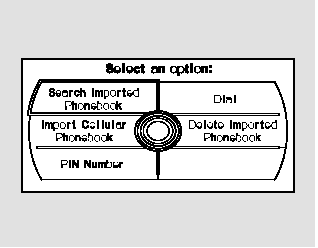
On models with navigation system
1. Press the INFO button, then select ‘‘Cellular Phone.’’ 2. Select ‘‘Search Imported Phonebook.’’
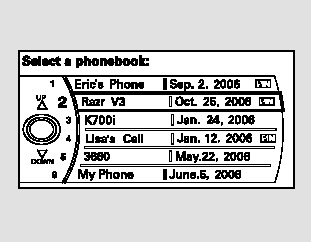
3. Select a phonebook you want to choose a phone number from.
If the phonebook you select is PINprotected, you will need to enter the PIN to access it.
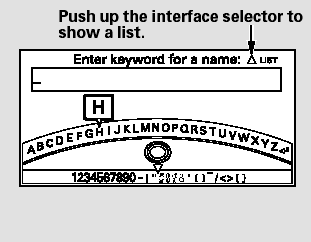
To search for a specific name in the phonebook, enter the keyword for either the first or last name.
To display all names in the phonebook, select the ‘‘List’’ option.
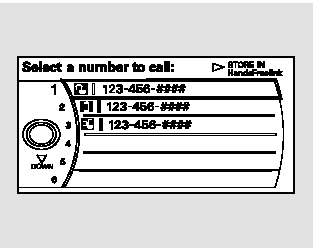
4. Select the name. All the phone numbers stored for that name will be listed.
5. Select the phone number, and push the interface selector to the right.
Selecting ‘‘Store in HandsFreeLink,’’ the phone number will be stored in HFL, so that you can call it using HFL’s name tag by voice.
To make a call using the navigation display (on models with navigation system):
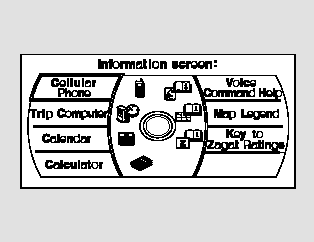
1. Press the INFO button, and the INFO screen will be shown.
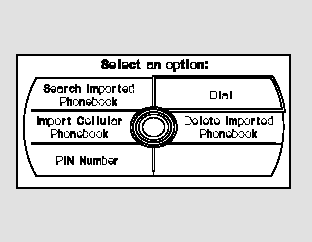
2. From the INFO screen, select ‘‘Cellular Phone,’’ then select ‘‘Dial.’’
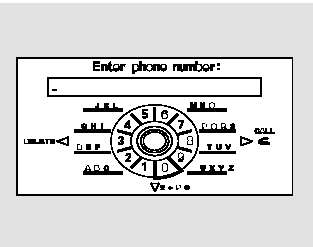
3. The navigation display will change as shown above. Enter a call number.
4. To make a call, press the selector on the interface dial to the right.
5. To end the call, press the HFL Back button.
 Phone Setup
This command group is available for
paired cell phones.
Phone pairing tips
You cannot pair your phone while
the vehicle is moving.
Your phone must be in discovery
or search mode to pair. Refe ...
 Receiving a Call
When you receive a call, an incoming
call notification (if activated) will
play and interrupt the audio system
if it is on.
Press the HFL Talk button to answer
the call, or the HFL Back butto ...
See also:
Cam Chain Inspection
Special Tools Required
Cam Chain inspection Gauge 07AAJ-RWCA100
1. Remove the front wheels.
2. Remove the splash shield (see step 25 on page 5-5).
3. Remove the cylinder head cover (see page 6 ...
Emergency Towing
If your vehicle needs to be towed,
call a professional towing service or
organization. Never tow your vehicle
with just a rope or chain. It is very
dangerous.
There are two ways to tow your
...
Engine Number
Engine Type
K24Z3: 2.4 L DOHC i-VTEC Sequential Multiport
Fuel-injected, 190HP engine
Serial Number
1000001-: Except PZEV
1500001-: PZEV ...