
 Honda Accord: Key Types and Functions
This vehicle comes with the following key:
All of the keys have an immobilizer system. The immobilizer system helps to protect against vehicle theft.
The keys contain precision electronics.
Adhere to the following advice to prevent damage to the electronics:
• Do not leave the keys in direct sunlight, or in
locations with high temperature or high humidity.
• Do not drop the keys or set heavy objects on them.
• Keep the keys away from liquids.
• Do not take the keys apart except for replacing the
battery.
If the circuits in the keys are damaged, the engine may not start, and the remote transmitter may not work.
If the keys do not work properly, have them inspected by a dealer.
• Master Keys
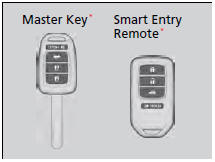
Use the keys to start and stop the engine, to lock and unlock the doors and to open the trunk. You can also use the remote transmitter or smart entry system* to lock and unlock the doors and to open the trunk.
There is a panic button in the remote transmitter.
• Smart entry remote
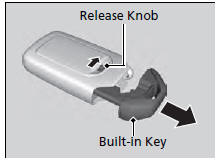
The built-in key can be used to lock/unlock the doors when the smart entry remote battery becomes weak and the power door lock/ unlock operation is disabled.
To remove the built-in key, pull it out while sliding the release knob. To reinstall the builtin key, push the built-in key into the smart entry remote until it clicks.
• Valet Key*
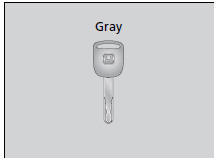
Can be used to start and stop the engine, and lock and unlock driver's door.
When you need to leave a key with a third party, leave the valet key.
• Key Number Tag
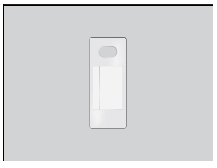
Contains a number that you will need if you purchase a replacement key.
Keep the key number tag separate from the key in a safe place outside of your vehicle.
If you wish to purchase an additional key, contact a dealer.
If you lose your key and you cannot start the engine, contact a dealer.

 Low Smart Entry Remote SignalStrength*
The vehicle transmits radio waves to locate the smart entry remote when
locking/
unlocking the doors, opening the trunk, or to start the engine.
In the following cases, locking/unlocking the door ...
See also:
Maintenance
...
Component Location Index
'10 model
With navigation
Without navigation
...
Troubleshooting
B-CAN System Diagnosis Test Mode
A
Check the ECM/PCM for DTCs and troubleshoot .
ECM/PCM (see page 11-3) or F-CAN loss of
communication errors first, then do this diagnosis if the
symptom is related to the B-CAN system.
1. Comp ...