
 Honda Accord: iPod Error Messages (Models with navigation system)
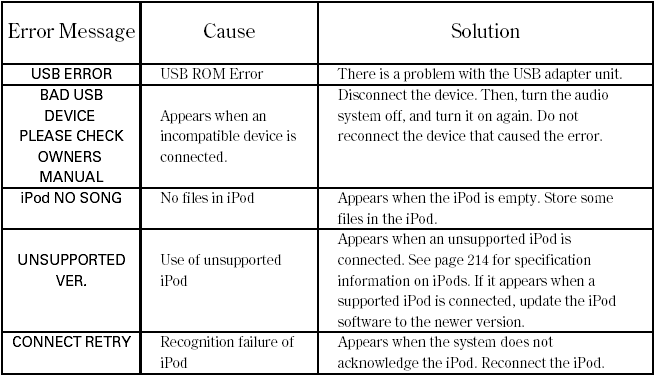
If you see an error message in the center display while playing an iPod, find the solution in the chart to the right. If you cannot clear the error message, take your vehicle to your dealer.
 To Stop Playing Your iPod
To play the radio, press the FM/AM,
or button. Press the CD button
to switch to the disc mode. Press the
AUX button to switch back to the
iPod.
Disconnecting an iPod
You can disconnect the ...
 Playing a USB Flash Memory Device (Models with navigation system)
Playing a USB Flash Memory Device (Models with navigation system) ...
See also:
Alternator Removal and
Installation
Removal
1. Do the battery terminal disconnection procedure (see
page 22-91).
2. Remove the drive belt (see page 4-30).
3. Remove the two bolts securing the alternator.
4. Disconnect the alt ...
Front Passenger's Power Window
Switch Input Test
1. Turn the ignition switch to LOCK (0), open and close the driver's door,
then remove the front passenger's power
window switch.
• 4-door (see page 22-306)
• 2-door (see page 22-307)
...
Oil Filter Feed Pipe Replacement
1. Remove the oil filter base (see page 8-13).
2. Remove the oil filter feed pipe.
3. Install the two 20 x 1.5 mm nuts (A) onto the new oil
filter feed pipe. Hold one nut with a wrench, then us ...