
 Honda Accord: In-car Temperature Sensor Test
NOTE: Before testing the sensor, check for HVAC DTCs (see page 21-101).
1. Remove the in-car temperature sensor (see page 21-184).
2. Test the in-car temperature sensor while holding it in front of the dashboard center vent.
• Measure the resistance with the system set to Max Cool.
• Measure the resistance with the system set to Max Hot.
3. Compare the resistance reading between terminals No. 1 and No. 2 of the in-car temperature sensor with the specifications shown in the graph; the resistance should be within the specifications for whatever the ambient temperature is.
IN-CAR TEMPERATURE SENSOR
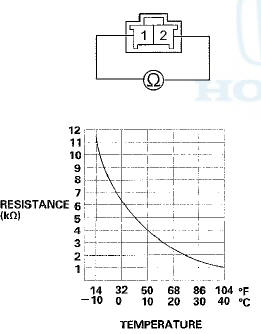
4. If the resistance is not as specified, replace the in-car temperature sensor (see page 21-184).
 A/C Signal Circuit Troubleshooting
NOTE:
• If the blower motor does not run at all speeds, the A/C
compressor will be inoperative. Run the
self-diagnostic function, and check for DTC B1241.
Before performing any other troubl ...
 In-car Temperature Sensor
Replacement
In-car Temperature Sensor
Replacement
1. Remove the driver's inner dashboard trim (see page
20-167).
2. Disconnect the connector (A), and remove the in-car
temperature sensor (B) from the air hose (C).
3. Install the sensor in the ...
See also:
Shift Solenoid Valve Removal and
Installation
NOTE:
-Do not hold the shift solenoid valve connector to
remove and to install the shift solenoid valves. Hold
the shift solenoid valve b o d y .
-Do not install the shift solenoid valve A before ...
Resuming the Set Speed
When you push the CANCEL button,
or tap the brake or clutch pedal, the
system will remember the previously
set cruising speed. To return to that
speed, accelerate to above 25 mph
(40 km/h), ...
Bearing Removal
Special Tools Required
•Attachment, 78x80 mm 07NAD-PX40100
-Driver Handle, 15 x 135L 07749-0010000
-Bearing Driver Attachment, 42 x 47 07746-0010300
1. Remove the idler gear shaft (see page 1 ...