
 Honda Accord: HVAC Control Unit
Removal / Installation
Honda Accord: HVAC Control Unit
Removal / Installation
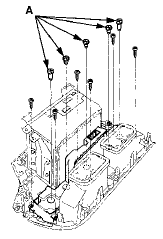
1. Remove the audio unit (see page 23-115).' 2. Remove the self-tapping screws. If necessary, replace the bulbs (A).
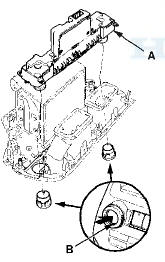
3. While holding the HVAC control unit (A), firmly press the center of one of the dials (B) to remove the outer dial. Repeat for the other outer dial, then remove the unit.
4. Install the control unit in the reverse order of removal.
After installation, operate the various functions to make sure they work properly.
5. Run the self-diagnostic function to confirm that there are no problems in the system (see page 21-10).
 Recirculation Control Motor
Replacement
Recirculation Control Motor
Replacement
1. Remove the glove box (see page 20-174).
2. Disconnect the 7P connector (A) from the
recirculation control motor (B). Remove the
self-tapping screws and the recirculation control
motor from th ...
 Blower Unit Removal/Installation
1. Remove the glove box (see page 20-174).
2. Remove the passenger's undercover (see page
20-170).
3. Remove the right kick panel (see page 20-107).
4. Remove the dust and pollen filter asse ...
See also:
Key Interlock Solenoid Test
NOTE: SRS components are located in this area. Review
the SRS component locations for 4-door (see page
24-21),for 2-door (see page 24-23), and the precautions
and procedures (see page 24-25) before ...
Rear License Plate Light Bulbs
The license plate has two lights
above it. The bulbs should be
replaced by your dealer. ...
Emergency Towing
If your vehicle needs to be towed,
call a professional towing service or
organization. Never tow your vehicle
with just a rope or chain. It is very
dangerous.
There are two ways to tow your
...