
 Honda Accord: HomeLink® Universal Transceiver*
The HomeLink® Universal Transceiver can be programmed to operate up to three remote controlled devices around your home, such as garage doors, lighting, or home security systems.
• Important Safety Precautions
Refer to the safety information that comes with your garage door opener to test that the safety features are functioning properly. If you do not have the safety information, contact the manufacturer.
Before programming HomeLink, make sure that people and objects are out of the way of the garage or gate to prevent potential injury or damage.
When programming a garage door opener, park just outside the garage door’s path.
HomeLink® is a registered trademark of Johnson Controls., Inc.
Before programming HomeLink to operate a garage door opener, confirm that the opener has an external entrapment protection system, such as an “electronic eye,” or other safety and reverse stop features. If it does not, HomeLink may not be able to operate it.
Training HomeLink
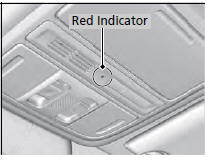
If you have not trained any of the buttons in HomeLink before, you should erase any previously learned codes. To do this:
• Press and hold the two outside buttons for
about 20 seconds, until the red indicator
blinks. Release the buttons, and proceed to
step 1.
• If you are training the second or third
button, go directly to step 1.
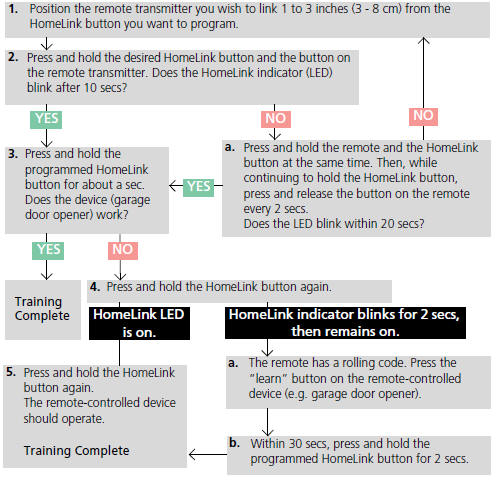
Training a Button
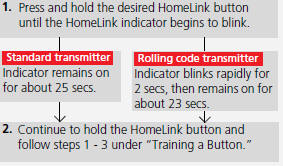
Retraining a Button
If you want to retrain a programmed button for a new device, you do not have to erase all button memory. You can replace the existing memory code using this procedure:
Erasing Codes
To erase all the codes, press and hold the two outside buttons until the HomeLink indicator begins to blink (about 10 to 20 secs). You should erase all codes before selling the vehicle.
If you have any problems, see the device’s instructions, visit www.homelink.com, or call HomeLink at (800) 355-3515.
 Deleting all HDD Data
Reset all the menu and customized settings, and delete all music data on the
HDD.
1. Turn on the audio system and select the
HDD mode.
2. Press the SETTINGS button.
3. Rotate to select Aud ...
 Bluetooth® HandsFreeLink®
Bluetooth® HandsFreeLink® (HFL) allows you to place and receive phone calls
using
your vehicle’s audio system, without handling your cell phone.
Using HFL
• HFL Buttons
(Pick-up) b ...
See also:
Waive Guide Replacement
Special Tools Required
Valve Guide Driver, 5.35 x 9.7 mm 07742-0010100
Valve Guide Reamer, 5.5 mm 07HAH-PJ7A100
1. Inspect the valve stem-to-guide clearance (see page
6-88).
2. As illustrated, ...
Rear Brake Caliper Overhaul
Frequent inhalation of brake pad dust, regardless of material composition,
could be hazardous to your health.
- Avoid breathing dust particles.
- Never use an air hose or brush to clean brake ...
Component Location Index
Front
4-door Rear
...