
 Honda Accord: GPS Antenna
Removal/Installation
Honda Accord: GPS Antenna
Removal/Installation
1. Remove the rear shelf (see page 20-128).
2. Disconnect the GPS antenna connector (A), and remove the bolt (B).
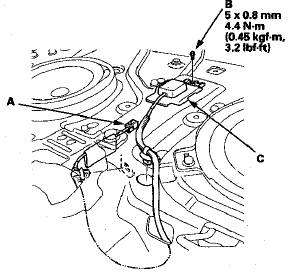
3. Detach the harness clips, and remove the GPS antenna (C).
4. Install the antenna in the reverse order of removal.
 Front HFL-Navigation-ANC
Microphone
Removal/Installation
Front HFL-Navigation-ANC
Microphone
Removal/Installation
NOTE:
• Put on gloves to protect your hands.
• Take care not to scratch the dashboard and related
parts.
• Lay a workshop towel under the parts when working
on them to protect ...
 Voice Control Switch Test
1. Remove the voice control switch (see page 17-7).
2. Measure the resistance between terminals No. 2 and
No. 4 in each switch position according to the table.
3. If the resistance is not as sp ...
See also:
Middle Floor Undercover
Replacement
Left Side
NOTE:
- Put on gloves to protect your hands.
- Take care not to scratch the body.
1. Remove the bolts and release the hook (A), then
remove the left middle floor undercover (B).
...
About Your Seat Belts
Seat belts are the single most effective safety device because they keep you
connected to the vehicle so that you can take advantage of many built-in safety
features. They also help keep you from ...
Protecting Children - General Guidelines
Children depend on adults to protect
them. However, despite their best
intentions, many adults do not know
how to properly protect child
passengers.
If you have children, or ever need to
...