
 Honda Accord: Fluid Replacement
Check the reservoir (A) at regular intervals, and add the recommended fluid as necessary. Always use Honda Power Steering Fluid. Using any other type of power steering fluid or automatic transmission fluid can cause increased wear, fluid leaks, and poor steering in cold weather.
NOTE; If the fluid is contaminated, the screen in the reservoir may be partially blocked. Inspect the reservoir screen for any debris. If the reservoir screen is clogged, replace the reservoir, and check for the source of the contamination.
System capacity;
1.05 L (1.11 US qt) at disassembly
Reservoir capacity:
0.32 L (0.34 US qt)
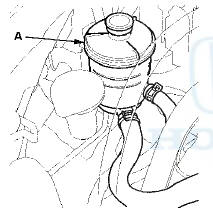
1. Remove the reservoir from its holder. Raise the reservoir, then disconnect the return hose (A) to drain the reservoir. Take care not to spill the fluid on the vehicle. Wipe off any spilled fluid at once.
NOTE: Inspect the reservoir screen for any debris. If the reservoir screen is clogged, replace the reservoir, and check for the source of the contamination.
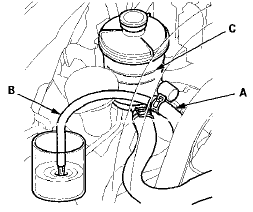
2. Connect a hose (B) of suitable diameter to the disconnected return hose, and put the hose end in a suitable container.
3. Start the engine, let it run at idle, and turn the steering wheel from lock to lock several times. When fluid stops running out of the hose, shut off the engine.
Discard the fluid.
NOTE: Stop the engine immediately once the fluid stops running out of the hose to prevent pump damage.
4. Reinstall the return hose on the reservoir.
5. Fill the reservoir to the upper level line (C).
6. Start the engine, and run it at idle. Turn the steering from lock to lock several times to bleed air from the system.
7 Recheck the fluid level and, add some if necessary. Do not fill the reservoir beyond the upper level line.
8. If the fluid is contaminated, dark, or discolored, repeat the procedure as necessary until the system is clean.

 Power Steering Hose, Line, and Pressure Switch
Replacement
Power Steering Hose, Line, and Pressure Switch
Replacement
Note these items during installation:
-Connect each hose to the corresponding line securely until it contacts the
stop on the line. Install the clamp or
adjustable clamp at the specified distance ...
See also:
To Play a USB Flash Memory Device
This audio system can select and
play the audio files on a USB flash
memory device with the same
controls used for the disc player. To
play a USB flash memory device,
connect it to the USB a ...
Front Bumper Removal/Installation
NOTE:
- Have an assistant help you when removing and
installing the front bumper.
- Take care not to scratch the front bumper
or the body.
- Put on gloves to protect your hands.
- When pr ...
DTC Troubleshooting
DTC B10CF: Left Daytime Running Lights
Circuit Malfunction
NOTE:
• Make sure the No. 15 (7.5 A) fuse in the driver's
under-dash fuse/relay box is OK.
• If you are troubleshooting mult ...