
 Honda Accord: Evaporator Temperature Sensor Test
NOTE: Before testing the sensor, check for HVAC DTCs (see page 2 1 - 9).
1. Remove the evaporator temperature sensor (see page 21-67).
2. Dip the sensor in ice water, and measure the resistance between its terminals.
EVAPORATOR TEMPERATURE SENSOR
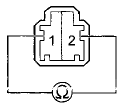
Terminal side of male terminals
3. Pour warm water on the sensor, and check for a change in the resistance.
4. Compare the resistance readings with the specifications shown in the graph; the resistance should be within the specifications.
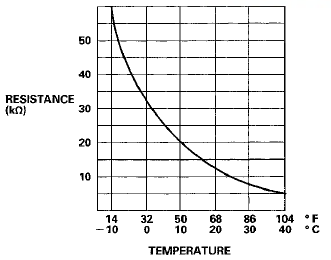
5. If the resistance is not as specified, replace the evaporator temperature sensor (see page 21-67).
 A/C Signal Circuit Troubleshooting
NOTE:
• If the blower motor does not run at all speeds, the A/C
compressor will be inoperative. Run the
self-diagnostic function, and check for DTC 12. Before
performing any other troubleshoo ...
 Power Transistor Test
1. Remove the passenger's dashboard undercover (see
page 20-170).
2. Disconnect the 4P connector from the power
transistor.
3. Measure the resistance between terminals No. 3 and
No. 4 of the ...
See also:
Braking System
Your vehicle is equipped with disc
brakes at all four wheels. A power
assist helps reduce the effort needed
on the brake pedal. The emergency
brake assist system increases the
stopping force ...
Symptom Troubleshooting
Immobilizer Indicator blinks
NOTE; Before troubleshooting, check the Items listed In
"General Check before Troubleshooting".
1. Turn the ignition switch to LOCK (0).
2. Connect the H ...
Gauges
Gauges ...