
 Honda Accord: Drive Belt
Removal/Installation
Honda Accord: Drive Belt
Removal/Installation
Special Tools Required
Belt Tension Release Tool Snap-on YA9317 or equivalent, commercially available
1. Move the auto-tensioner (A) with the belt tension release tool (B) in the direction of the rotation arrow to relieve tension from the drive belt (C), then remove the drive belt.
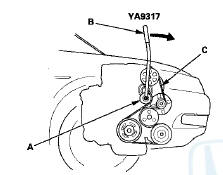
2. Install the new drive belt in the reverse order of removal.
 Drive Belt Inspection
1. Inspect the belt for cracks or damage. If the belt is
cracked or damaged, replace it (see page 4-30).
2. Check the position of the auto-tensioner indicator's
pointer (A) is within the standard ...
 Drive Belt Auto-tensioner
Inspection
Drive Belt Auto-tensioner
Inspection
Special Tools Required
Belt Tension Release Tool Snap-on YA9317 or
equivalent, commercially available
1. Turn the ignition switch to ON (II), and make sure to
turn the A/C switch OFF. Turn the ign ...
See also:
How to Set Readiness Codes
Malfunction Indicator Lamp (MIL) Indication
(In relation to Readiness Codes)
The vehicle has certain readiness codes that are part of
the on-board diagnostics for the emissions systems, If
the veh ...
Air Mix Control Motor Test
NOTE: Before testing the motor, check for HVAC DTCs
(see page 21-9).
1. Disconnect the 7P connector from the air mix control
motor.
Incorrectly applying power and ground to the air mix
contro ...