
 Honda Accord: Drain Channel Replacement
1. Remove the moonroof glass (see page 20-91).
2. On both sides, slide the glass brackets (A) with the moonroof switch to the position where the moonroof normally tilts up and disconnect the drain channel rods (B).

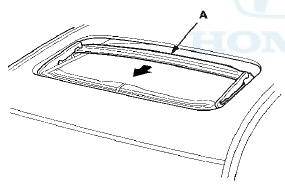
3. Slide the drain channel (A) forward.
4. Pull up the rear edge of the drain channel (A) while pushing both clips (B), and release the channel from both hooks (C) of the drain channel slider by pulling it rearward.
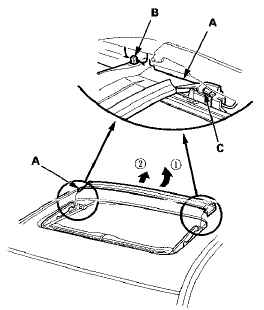
5. Remove the drain channel.
6. Install the channel in the reverse order of removal, and note these items: - Push the clip areas into place securely.
- Check the glass position adjustment (see page 20-91).
7. Check for water leaks (see step 9 on page 20-57). Let the water run freely from a hose without a nozzle. Do not use a high-pressure spray.
 Wind Deflector Replacement
NOTE: When prying with a flat-tip screwdriver, wrap it
with protective tape to prevent damage.
1. Open the glass fully.
2. Remove the deflector links (A) from both sides.
3. Remove the wind ...
 Sunshade Replacement
1. Remove the drain channel (see page 20-94).
2. Slide the sunshade (A) until you can see both
sunshade slider spacers (B).
3. Remove the screws, then remove both sunshade
slider spacers.
4. ...
See also:
Front Seat Slide Motor Replacement
SRS components are located in this area. Review the
SRS component locations, 2-door (see page 24-23),
4-door (see page 24-21) and the precautions and
procedures (see page 24-25) before doing repair ...
Fuel Gauge Sending Unit Test
NOTE: For the fuel gauge system circuit diagram, refer
to the Gauges Circuit Diagram (see page 22-336).
1. Check the No. 5 METER (7.5 A) fuse in the driver's
under-dash fuse/relay box before test ...
Ignition Coil and Spark Plug
Removal/Installation
1. Remove the ignition coil cover (A).
2. Disconnect the ignition coil connectors (B), then
remove the ignition coils (C).
3. Remove the spark plug and inspect them (see page
4-20).
4. Appl ...