
 Honda Accord: Door Locks
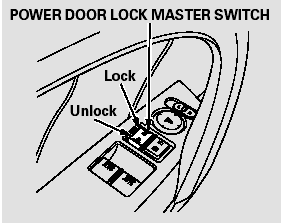
To lock both doors, push the front of the master door lock switch on either door, pull the lock tab rearward on the driver’s door, or use the key on the outside lock on the driver’s door.
Pushing forward the lock tab on the driver’s door only unlocks that door.
Pushing the rear of either master door lock switch will unlock both doors.
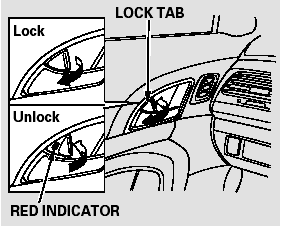
The lock tab on the passenger’s door locks and unlocks that door.
When the door is unlocked, you can see the red indicator on the lock tab above the inner door handle.
Both doors can be locked from the outside by using the key in the driver’s door. To unlock only the driver’s door, insert the key, turn it clockwise, and release it. The passenger’s door unlocks when you turn the key a second time within a few seconds.
You can open or close the windows and the moonroof (if equipped) by using the key in the driver’s door.
To lock the passenger’s door when getting out of the vehicle, pull the lock tab rearward and close the door.
To lock the driver’s door, remove the key from the ignition switch, pull the lock tab rearward or push the front of the master switch, then close the door.
Lockout Prevention
If you forget and leave the key in the ignition switch, lockout prevention will not allow you to lock the driver’s door. With either door open and the key in the ignition switch, locking with the master door lock switch is disabled. If the driver’s door is closed, the lock tab on the driver’s door is not disabled. Pulling the driver’s lock tab rearward will lock both doors. If you try to lock an open driver’s door by pulling the lock tab rearward, the driver’s door lock tab pops out and unlocks the driver’s door.
 Immobilizer System
The immobilizer system protects
your vehicle from theft. If an
improperly coded key (or other
device) is used, the engine’s fuel
system is disabled.
When you turn the ignition switch to
t ...
 Auto Door Locking/Unlocking
Your vehicle has customizable
settings for the doors to
automatically lock and unlock. There
are default settings for each of these
features. You can turn off or change
the settings for thes ...
See also:
DTC Troubleshooting
DTC P0010: VTC Oil Control Solenoid Valve
Malfunction
NOTE: Before you troubleshoot record all freeze data
and any on-board snapshot and review the general
troubleshooting Information (see page 11 ...
Driver’s Seat Manual Height Adjustment
LX and EX models
The height of your driver’s seat is
adjustable. To raise the seat,
repeatedly pull up the lever on the
outside of the seat cushion. To lower
the seat, push the lever down ...
Oil Filter Feed Pipe Replacement
1. Remove the oil filter base (see page 8-13).
2. Remove the oil filter feed pipe.
3. Install the two 20 x 1.5 mm nuts (A) onto the new oil
filter feed pipe. Hold one nut with a wrench, then us ...