
 Honda Accord: Clutch Hydraulic System Bleeding
NOTE: - Do not reuse the drained fluid. Always use Honda DOT 3 Brake Fluid from an unopened container. Using a non-Honda brake fluid can cause corrosion and shorten the life of the system.
- Make sure no dirt or other foreign matter is allowed to contaminate the brake fluid.
- Do not spill brake fluid on the vehicle; it may damage the paint or plastic. If brake fluid does contact the paint or plastic, wash it off immediately with water.
- It may be necessary to limit the movement of the release fork with a block of wood to remove all the air from the system.
- Use fender covers to avoid damaging painted surfaces.
1. Do the battery removal procedure (see page 22-92).
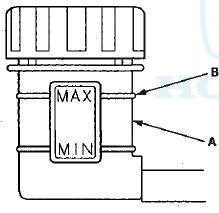
2. Make sure the brake fluid level in the clutch reservoir (A) is at the MAX (upper) level line (B).
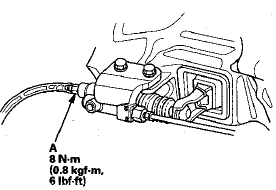
3. Attach one end of a clear tube to the bleeder screw (A), and put the other end into a container. Loosen the bleeder screw to allow air to escape from the system.
4. Make sure there is an adequate supply of fluid in the reservoir, then slowly push the clutch pedal all the way down. Before releasing the pedal, have an assistant temporarily tighten the bleeder screw.
Loosen the bleeder screw, and push the clutch pedal down again. Repeat this step until no more bubbles appear at the clear tube.
NOTE: Make sure the fluid level on the reservoir does not go below MIN.
5. Tighten the bleeder screw securely.
6. Refill the brake fluid in the reservoir to the MAX (upper) level line.
7. Do the battery installation procedure (see page 22-92).
 System Description
Delay Orifice Mechanism
Function
The delay orifice mechanism improves clutch operation by delaying the slave
cylinder release speed when the clutch
pedal is suddenly released. The delay orifice m ...
 Clutch Pedal, Clutch Pedal Position Switch, and
Clutch Interlock Switch Adjustment
Clutch Pedal, Clutch Pedal Position Switch, and
Clutch Interlock Switch Adjustment
NOTE:
- For a cruise control problem, check the clutch pedal
position switch (see page 4-45).
- For a clutch interlock operation problem, check the
clutch interlock switch (see page 4-9).
- R ...
See also:
Door Key Cylinder Switch Test
1. Remove the driver's door panel (see page 20-17).
2. Disconnect the 10P connector (A) from the door lock
actuator (key cylinder switch) (B).
3. Check for continuity between the terminals.
...
Transmission Fluid
• Continuously Variable Transmission (CVT) Fluid
Have a dealer check the fluid level and replace if necessary.
NOTICE
Do not mix HCF-2 with other transmission fluids.
Using a transmission ...
Starting the Engine
1. Apply the parking brake.
2. In cold weather, turn off all
electrical accessories to reduce
the drain on the battery.
3. Manual transmission:
Press the clutch pedal down all the
way. The ST ...