
 Honda Accord: Cellular Phonebook
(available on some phones)
On models with navigation system
If you select Cellular Phone from the Information screen menu, you will see five HFL options.
For a list of cell phones that are compatible with this feature:
In the U.S., visit handsfreelink.honda.
com or call (888) 528-7876.
In Canada, visit www.handsfreelink.ca, or call (888) 528-7876.
Import Cellular Phonebook:
The entire phonebook data of the cell phone that is linked to HFL can be imported to the navigation system.
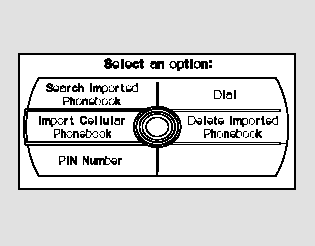
Select ‘‘Import Cellular Phonebook,’’ and HFL will begin importing the phonebook. Select ‘‘OK’’ after the import is completed.
Search Imported Phonebook:
Once a phonebook has been imported, you can search the phone numbers by the person’s name.
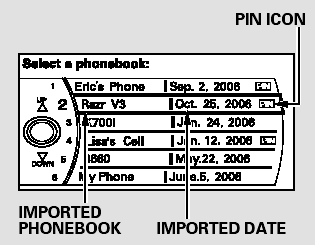
Select ‘‘Search Imported Phonebook,’’ and a list of imported phonebooks will be displayed.
Select a phonebook from the list.

If the phonebook is PIN-protected, you will need to enter the 4-digit PIN.

To search for a specific name in the phonebook, enter the keyword for either the first or last name.
To display all names in the phonebook, select the ‘‘List’’ option.
Select a person from the list. Up to three category icons are displayed in the left side of the list:
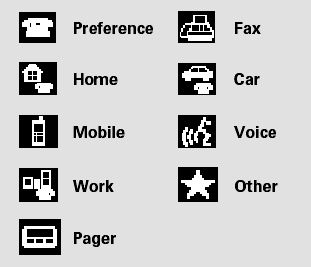
These indicate how many numbers are stored for the name. If a name has more than three category icons, ‘‘…’’ is displayed.
Select the person’s number you want to call, and press the HFL Talk button.
Delete Imported Phonebook:
You can delete any imported phonebook.
Select ‘‘Delete Imported Phonebook,’’ and a list of imported phonebooks will be displayed.
Select a phonebook you want to delete. If the phonebook is PINprotected, you will need to enter the 4-digit PIN number.
After making a selection, the following screen will appear.
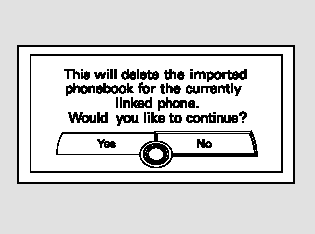
Select ‘‘Yes,’’ then ‘‘OK’’ to complete the deletion.
 Transferring a Call
You can transfer a call from HFL to
your phone, or from your phone to
HFL.
Press and release the HFL Talk
button and say ‘‘Transfer.’’ ...
 PIN Number
You can add, change, or remove a
PIN number from any phonebook.
To add a PIN:
If you have selected a phonebook
without a PIN, you will see the above
display.
Enter the new 4-digit PIN. You ...
See also:
Fuel Cap Warning Message System
Troubleshooting
Special Tools Required
- Vacuum Pump/Gauge, 0 - 3 0 In.Hg, Snap-on YA4000A
or equivalent, commercially available
- Vacuum/Pressure Gauge, 0 - 4 In.Hg, 07JAZ-001000B
comes on frequently, or if the ...
Inspection and Maintenance
For your safety, perform all listed inspections and maintenance to keep your
vehicle
in good condition. If you become aware of any abnormality (noise, smell,
insufficient
brake fluid, oil resi ...
Switch Test/Replacement
1. Remove the center console panel (see page 20-157).
2. Disconnect the 6P (or 7P*) connector from the seat
heater switch, then remove the switch.
*: Front passenger's seat heater switch
3. ...