
 Honda Accord: Auxiliary Input Jack
Use the jack to connect standard audio devices.
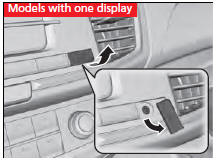
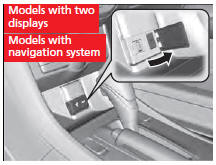
1. Open the AUX cover.
2. Connect a standard audio device to the
input jack using a 1/8 inch (3.5 mm) stereo
miniplug.
- The audio system automatically switches
to the AUX mode.

You can return to the AUX mode by pressing the AUX button.

You can return to the AUX mode by selecting Change Source on the Audio menu screen or Source on the touchscreen.
You cannot use the auxiliary input jack if you replace the audio system.
 USB Port
Install the iPod® dock connector or the USB
flash drive to the USB port.
• Do not leave the iPod® or USB flash drive in the
vehicle. Direct sunlight and high temperatures may
damage it.
...
 Audio System Theft Protection*
The audio system is disabled when it is disconnected from the power source,
such as
when the battery is disconnected or goes dead.
• Reactivating the audio system
1. Set the power mode to ON, ...
See also:
PIN Number
You can add, change, or remove a
PIN number from any phonebook.
To add a PIN:
If you have selected a phonebook
without a PIN, you will see the above
display.
Enter the new 4-digit PIN. You ...
Carrying Items in the Passenger Compartment
Store or secure all items that could
be thrown around and hurt
someone during a crash.
Do not put any items on top of the
rear shelf. They can block your
view and be thrown around the
vehic ...
Fuel Fill Pipe Removal/Installation
1. Drain the fuel tank (see page 11-309).
2. Remove the fuel fill cap.
3. Remove the left rear wheel.
4. Remove the fuel fill pipe cover (A).
5. Disconnect the quick-connect fittings (A) ( ...