
 Honda Accord: Audio Remote Controls
Allows you to operate the audio system while driving.
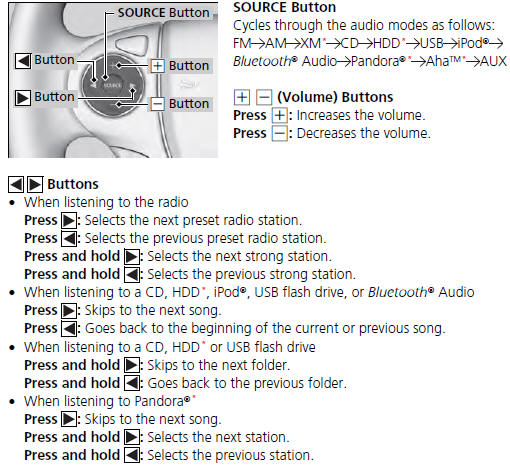
The CD mode appears only when a CD is loaded.

 Region Setting
The audio system’s region setting will be lost when the battery is
disconnected or
goes dead.
If the Region Select screen appears, you need to set the region for
the audio
system. Follow th ...
 Audio System Basic Operation
To use the audio system function, the ignition switch must be in ACCESSORY
or
ON
Use the selector knob or MENU button to
access some audio functions.
Press to switch between the
normal ...
See also:
Driver’s Seat Power Adjustments
Except LX and EX
See for important safety
information and warnings about how to
properly position the seats and seatbacks.
The controls for the power
adjustable driver’s seat are on the
ou ...
DLC Circuit Troubleshooting
NOTE: If you suspect the HDS or the HDS DLC cable may
be the source of the communication probrem, verify that
they are working properly by connecting them to a
known-good, like vehicle and system, ...
Dashboard Side Vent
Removal/Installation
Special Tools Required
KTC Trim Tool Set SOJATP2014*
* Available through the Honda Tool and
Equipment
Program; call 888-424-6857
NOTE;
- Take care not to scratch the dashboard or the related
p ...