
 Honda Accord: Active Noise Cancellation
Microphone
Removal/Installation
Honda Accord: Active Noise Cancellation
Microphone
Removal/Installation
Front
1. Remove the roof console (see page 20-140), and disconnect the connector (A) from the front active noise cancellation microphone (B).
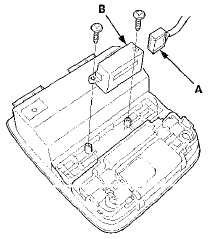
2. Remove the screws and the front active noise cancellation microphone.
3. Install the microphone in the reverse order of removal.
Rear
1. Remove the rear shelf (see page 20-128).
2. Disconnect the connector (A), then remove the screws and the rear active noise cancellation microphone (B).
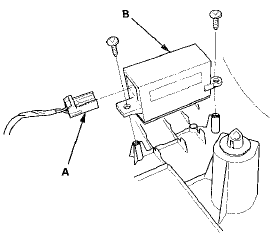
3. Install the microphone in the reverse order of removal.
 XM Receiver Removal/Installation
1. Open the trunk lid, and remove the right trunk side
trim panel {see page 20-132).
2. Disconnect the connectors (A) from the XM receiver
(B).
4-Door
3. Remove the mounting bolt (C) and lo ...
 Crossover Network Control Unit
Removal/Installation
Crossover Network Control Unit
Removal/Installation
Driver's Door Speaker Crossover Network
Control Unit
1. Remove the driver's dashboard lower cover (see page
20-166).
2. Disconnect the connector (A), then remove the
driver's door speaker cross ...
See also:
Evaporator Temperature Sensor Test
NOTE: Before testing the sensor, check for HVAC DTCs
(see page 2 1 - 9).
1. Remove the evaporator temperature sensor (see
page 21-67).
2. Dip the sensor in ice water, and measure the
resistan ...
Checking the Battery
Check the condition of the battery
monthly by looking at the test
indicator window. The label on the
battery explains the test indicator’s
colors.
The location of the test indicator
win ...
Voice Control Switch
Replacement
1. Remove the steering wheel (see page 17-6).
2. Remove the voice control switch (see page 17-7).
3. Install the voice control switch in the reverse order of
removal. ...