
 Honda Accord: About Your Audio System

See the Navigation System Manual for information on the navigation system.
The audio system features AM/FM radio and the XM® Radio service*. It can also play audio CDs, WMA/MP3/AAC files, Hard Disc Drive (HDD) audio*, USB flash drives, and iPod®, iPhone® and Bluetooth® devices.
You can operate the audio system from the buttons and switches on the panel, the icons on the touchscreen interface*.
XM® Radio is available on a subscription basis only.
For more information on XM® Radio, contact a dealer.
XM® Radio is available in the United States and Canada, except Hawaii, Alaska, and Puerto Rico.
XM® is a registered trademark of Sirius XM Radio, Inc.
Video CDs, DVDs, and 3-inch (8-cm) mini CDs are not supported.
iPod® and iPhone® are registered trademarks owned by Apple Inc.
State or local laws may prohibit the operation of handheld electronic devices while operating a vehicle.
 Audio System
...
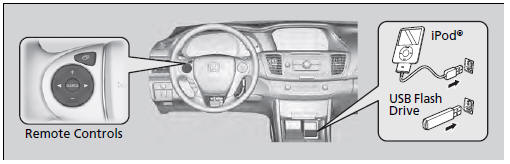
 USB Port
Install the iPod® dock connector or the USB
flash drive to the USB port.
• Do not leave the iPod® or USB flash drive in the
vehicle. Direct sunlight and high temperatures may
damage it.
...
See also:
Waive Guide Replacement
Special Tools Required
Valve Guide Driver, 5.35 x 9.7 mm 07742-0010100
Valve Guide Reamer, 5.5 mm 07HAH-PJ7A100
1. Inspect the valve stem-to-guide clearance (see page
6-88).
2. As illustrated, ...
Frame and Drain Tube Replacement
SRS components are located in this area. Review the
SRS component locations, 2-door (see page 24-23),
4-door (see page 24-21) and the precautions and
procedures (see page 24-25) before doing repair ...
Compatible iPod®, iPhone®, and USB Flash Drives
• iPod® and iPhone® Model Compatibility
This system may not work with all software versions
of these devices.
• USB Flash Drives
• Use a recommended USB flash drive of 256 MB or higher. ...