
 Honda Accord: A/T Clutch Pressure Control Solenoid
Valve B and C Replacement
Honda Accord: A/T Clutch Pressure Control Solenoid
Valve B and C Replacement
1. Do the battery removal procedure (see page 22-92).
2. Remove the battery base (see step 8 on page 5-3).
3. Disconnect the A/T clutch pressure control solenoid valves B and C connectors.
4. Remove N T clutch pressure control solenoid valves B andC.
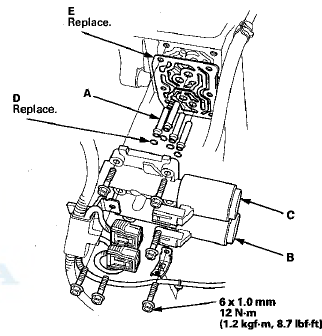
5. Remove the ATF joint pipes (A), the O-rings (D), and the gasket (E).
6. Clean the mounting surface and the fluid passages of the transmission housing.
7. Install a new gasket on the transmission housing, and install the ATF joint pipes. Install new O-rings over the ATF joint pipes.
NOTE: Be sure to install a new gasket with the blue side toward the transmission housing.
8. Install new A/T clutch pressure control solenoid valves B and C.
9. Check the connectors for rust, dirt, or oil, and clean or repair if necessary. Then connect the connectors securely.
10. Install the battery base (see step 63 on page 5-22).
11. Do the battery installation procedure (see page 22-92).
 A/T Clutch Pressure Control Solenoid
Valve B and C Test
A/T Clutch Pressure Control Solenoid
Valve B and C Test
1. Connect the HDS to the DLC (A) located under the
driver's side of the dashboard.
2. Turn the ignition switch to ON (II). Make sure the HDS
communicates with the PCM. If it does not, go to the
...
 Input Shaft (Mainshaft) Speed Sensor
Replacement
Input Shaft (Mainshaft) Speed Sensor
Replacement
1. Remove the nut securing the under-hood fuse/relay
box, and swing it out of the way.
2. Remove the intake air duct and the air cleaner
housing.
3. Disconnect the input shaft (mainshaft) spee ...
See also:
Driver's Outer Middle Pad
Removal/Installation
Special Tools Required
KTC Trim Tool Set SOJATP2014*
*Available through the Honda Tool and
Equipment
Program; call 888-424-6857
NOTE:
- Take care not to scratch the dashboard or the related
pa ...
Sunlight Sensor Replacement
1. Remove the sunlight sensor (A) from the dashboard,
then disconnect the connector (B). Be careful not to
damage the sensor and the dashboard.
2. Install the sensor in the reverse order of remov ...
Track Scan
When you press the SCAN side of
the SCAN/A. SEL bar or scroll down
and push the interface selector to
the left, the next track of the current
track plays for about 10 seconds.
You will see SC ...